
Omnisend vs Mailchimp for Shopify 2026: complete automation comparison
Omnisend vs Mailchimp for Shopify 2026 is a guide for teams that are right before the decision and need a practical, BOFU overview of automation. We’ll compare three layers that drive revenue: native ecommerce flows, the depth & flexibility of logic (conditions, branches, rate limits, multi-step orchestration) and ROI per 1000 sends. Since Shopify merchants measure time in hours and days, not weeks, it’s crucial to pick a tool that shortens time-to-value, simplifies operational work and combines email + SMS into one clear report.
In practice, this means: who can launch Welcome, Browse Abandonment, Cart/Checkout Abandonment, Post-purchase, Replenishment and Win-back faster; who can more easily add an SMS “ping” at the right moment; and who offers more granular conditions (SKU, collections, AOV/LTV, order count) without workarounds. All of this directly impacts revenue per send, team workload and long-term deliverability.
TL;DR verdict for Omnisend vs Mailchimp for Shopify 2026
Pick Omnisend if you want Shopify-first automations with a rich library of native flows, built-in SMS (quiet hours, compliance), granular event-level conditions and combined email+SMS reporting within the same flows. Result: faster time-to-value and fewer tools in your stack.
Pick Mailchimp if you stay with basic email campaigns, need simple automations without a strong dependency on SMS, and don’t mind that part of the ecommerce logic is handled less natively (or via integrations).
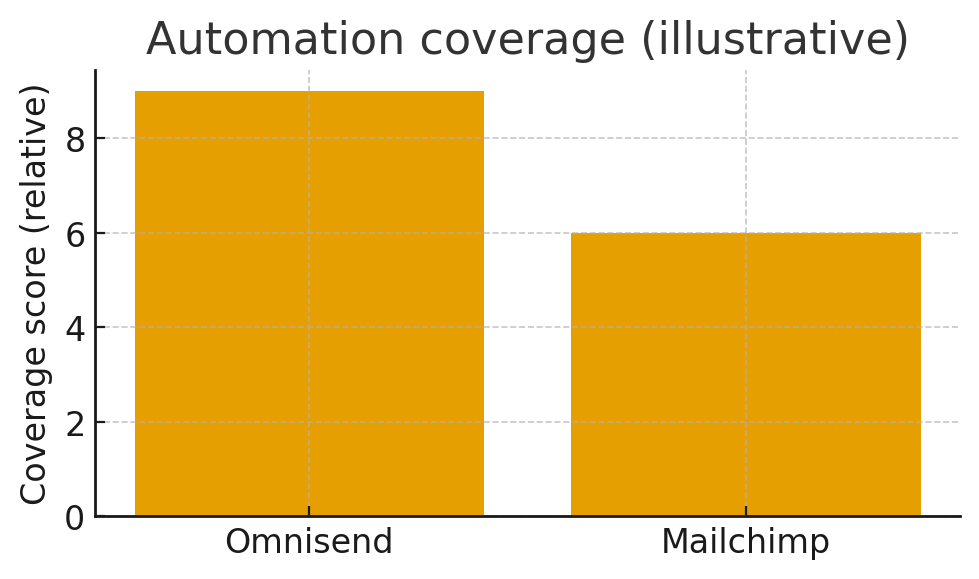
Time-to-value is key: more native flows and channels = fewer integrations, less operational friction and faster revenue.
Quick comparison Omnisend vs Mailchimp for Shopify 2026: Shopify automation fit
Automation capabilities matrix (18+)
Automation library & templates (practical)
In the Omnisend vs Mailchimp for Shopify 2026 discussion, the first difference is how quickly you can “attach” templates to real Shopify events. In Omnisend, most templates are already set with sensible delays and content suggestions (benefit-first, UGC, dynamic product blocks, recommendations), while in Mailchimp you’ll do more from scratch and configuration, especially if you want SMS as part of the same path.
- Welcome: 2–3 steps, second step with social proof, third with top collections; SMS reminder after 24 h.
- Browse: branching by category (e.g., “Skin-care” vs “Hair”); different angle and product.
- Cart/Checkout: e1 (1h), SMS (2–4h), e2 (24h), e3 (48h) with soft deadlines and an “assurance” block.
- Post-purchase: thank you + care tips → review ask → cross-sell; timing based on confirmed delivery.
- Win-back: 30/60/90, with VIP branches and AOV/LTV thresholds; offer escalates.
- Replenishment: based on the average consumption cycle; SMS reminder right before it runs out.
Segmentation & targeting (depth of conditions)
In segmentation, signals and configuration speed matter. In Omnisend you can combine product attributes, purchase signals and behavior (open/click) into a single condition in a few clicks. In Mailchimp, this is possible, but often with fewer signals and with a dependency on external SMS integrations that break the “single-pane” reporting view.
- VIP: AOV > threshold, LTV > threshold, order count ≥ X → dedicated path and different offer.
- At-risk: 60–90 days inactive, no purchase → win-back with social proof and free-returns signal.
- New vs Returning: different branching logic in welcome/cart; frequency cap within 7 days after purchase.
Orchestration & timing (email + SMS)
The biggest practical difference comes from controlling the “when” and “how much”. Omnisend allows rate-limit per branch, respects quiet hours and combines email+SMS in a single flow. This makes it easy to move SMS from 2 h to 6 h or turn it off for customers with a recent purchase. In Mailchimp, orchestration becomes progressively harder because you need to “offload” part of the logic to an SMS partner and then synchronize rules and reports.
- Example: Replenishment – email 10 days before the product runs out, SMS 2 days before → test impact on response.
- VIP branch – fewer SMS, more “concierge” tone in email, unique coupons.
SMS & compliance (pragmatic)
SMS is a “high-intent” channel. In Omnisend you have built-in consent rules and quiet hours by country; in Mailchimp this will often be handled by the SMS partner. For smaller lists, use SMS at transactional/high-intent touchpoints (cart saved, shipping, review); for BFCM, add one controlled promotional SMS with strict segmentation (active < 90 days).
- Economics: track revenue per SMS and cost share; if ROI is positive, keep the touches; if not, move them to email or lower frequency.
Reporting & attribution (speed of decisions)
Leaders need fast answers: “what worked in this flow as a whole.” Omnisend provides a unified view (email+SMS) and thus shortens analysis time. In Mailchimp, you’ll often switch between separate reports, which slows down iterations (e.g., shifting SMS timing, changing offer only for those who clicked but didn’t purchase).
Pricing context & TCO
The “cheapest” tool is not necessarily the lowest TCO (total cost of ownership). If you need to add an SMS partner to Mailchimp, you pay in integrations, configuration, testing, compliance and analysis time. In Omnisend, you combine channels, rules, testing and reporting in a single console. This is why Omnisend often delivers a lower TCO in practice at the same or higher growth rate.
Setup playbook Omnisend vs Mailchimp for Shopify 2026 (order of operations for Shopify)
- Connect Shopify → verify sender, time zone, unsubscribe standard and UTM convention.
- Authenticate your domain (SPF, DKIM, DMARC). Start with
p=none, then move toquarantine/rejectafter validation. - Launch core flows in the first hours: Welcome (2–3 steps), Browse, Cart/Checkout, Post-purchase (thank you, care, review ask), Win-back.
- Add SMS touches at high-intent points; respect quiet hours; limit SMS to segments with clear ROI.
- Segmentation: active < 90 days, recent buyers, VIP (AOV/LTV), at-risk; exclude “silent” from broadcasts.
- A/B & holdout: test timing/offers; introduce control groups once volume is large enough.
- Hygiene: monthly cleanup; suppress no-open/no-click after 90–120 days; keep complaints < 0.1%.
- Reporting cadence: weekly “revenue per 1k sends”, CTR, unsub/complaints; lower frequencies if metrics drop.
Deliverability & performance Omnisend vs Mailchimp for Shopify 2026 (why it matters)
Automations live and die by sender reputation. Regardless of tool, the hygiene basics should be constant: SPF/DKIM/DMARC, warm-up (start with your most engaged), sunset policy, light templates (<102KB) and consistent UTM. Omnisend makes this easier, adding an SMS “nudge” that stabilizes engagement signals (click/reply) and often improves future email placement. Mailchimp can also deliver very well, but without native SMS it’s harder to reach the same “cross-channel” rhythm without extra work.
ROI modeling: revenue per 1000 sends
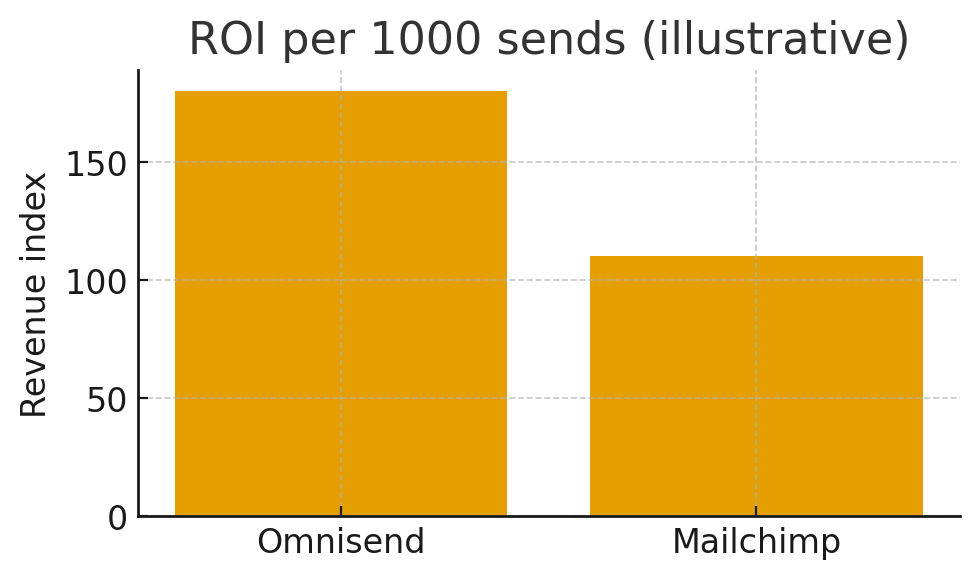
The fastest comparison is ROI per 1000 sends across key flows. Illustratively: welcome has high return due to fresh intent; cart/checkout are the “hottest” and most profitable; post-purchase drives LTV; win-back revives the “silent” part of the base. When you add SMS at the right points, click and response rates rise, lifting the ROI of the entire flow. If SMS becomes too expensive, limit it; if ROI is positive, keep it and test timing.
Scenarios: who should pick which
Scenario A — New Shopify brand (0–2.5k contacts)
You need a fast “go-live” without extra tools. Omnisend is more straightforward: launch 4–6 flows, add one SMS to cart, track the share of revenue from flows (target 5–10% by week two). If you quickly hit limits or need deeper segmentation, upgrade the plan; orchestration stays in the same console.
Scenario B — SKU-heavy catalog (5k–25k contacts)
Granularity by SKU/collections/AOV/LTV is mandatory. Omnisend lets you build more variants on low-click branches; in Mailchimp, similar logic is possible, but often without native SMS and with more “pieces” to track in reporting, which slows down iterations.
Scenario C — Seasonal peaks (BFCM, drops)
You need predictable volume, precise timing and cross-channel coordination. Omnisend shortens prep and analysis thanks to native SMS and combined reporting. Mailchimp works well for email-first strategies, but adding an SMS partner extends the operational cycle.
Scenario D — Basic email campaigns (no SMS)
If you stay with simple campaigns and minimal automation, Mailchimp is often enough. But if you expect growth and the need for cross-channel orchestration, the advantage will quickly tilt toward Omnisend.
Scenario E — Multi-locale or multi-store
Multiple stores or languages add complexity to segmentation, timing and reporting. Omnisend reduces TCO through channel consolidation. In Mailchimp, you’ll need to be careful with reconciling reports and the SMS partner.
Copy templates you can paste today
Welcome #1 — “Start with our best sellers”
- Subject: “Welcome! 10% off your first order”
- Body: brand promise, 3 benefits, product grid, one CTA; social proof module; link to returns
- Optional SMS (24h): “Your 10% is ready → {short link}”
Cart #2 — “We saved your cart”
- Subject: “Your items are almost gone”
- Body: dynamic products, guarantee, reasonable discount, deadline; FAQ block
- SMS (2–4h): “Your cart’s ready → {short link}” (respect quiet hours)
Post-purchase #1 — “Make it last longer”
- Subject: “Pro tips for your new item + a little thank you”
- Body: care tips, how-to, mini cross-sell; timing after delivery
Win-back #2 — “We miss you”
- Subject: “A little nudge to come back”
- Body: value reminder → limited discount; deadline; social proof
Most common mistakes Omnisend vs Mailchimp for Shopify 2026 (and quick fixes)
- Too many SMS on small lists. Limit to cart/shipping/transactional; promotional SMS only at seasonal peaks and in active segments.
- No sunset policy. After 90–120 days of inactivity, lower frequencies or suppress; protect your reputation.
- Too much design, not enough speed. Use templates + product blocks; launch in hours, not days.
- Testing without volume. First, stable flows and a clear KPI; then A/B once traffic is sufficient.
- SMS without ROI control. Track revenue/SMS and cost; adjust frequency/timing accordingly.
KPIs: what to track weekly
- Revenue per 1k sends by flow (email, SMS, combined)
- CTR and CVR by branch; impact of SMS timing
- Unsub/complaints (goal: complaints < 0.1%)
- Inbox proxy: open-rate trend for engaged segments
- Segment drift: share of “silent”, growth of VIP, share of at-risk
FAQs for Omnisend vs Mailchimp for Shopify 2026
Can I add SMS in Mailchimp?
Do both support complex if/else branches?
How quickly can I launch key flows in Omnisend?
Is “unlimited emails” in Omnisend truly unlimited?
Will more SMS hurt my email deliverability?
What about Analytics and GA4?
Can I keep the same “brand voice” in SMS and email?
Omnisend vs Mailchimp for Shopify 2026 – Which one should you pick?
- Shopify-first DTC → Omnisend (native flows, built-in SMS, combined reporting, fast TTV).
- SKU-heavy stores → Omnisend (conditions by SKU/collections/AOV/LTV, more variants in branches).
- Basic email needs → Mailchimp (if SMS and advanced orchestration are not priorities).
- Before BFCM → Omnisend (cart/browse + SMS pings for recapture, fast prep and unified reporting).
- Multi-store/locale → Omnisend (lower TCO thanks to centralized channels and reporting).
Final verdict
In Omnisend vs Mailchimp for Shopify 2026 Omnisend is the winner for Shopify automation in 2026: a rich set of native ecommerce flows, built-in SMS with quiet hours and combined reporting shorten time-to-value, reduce operational complexity and make scaling easier. Mailchimp remains an excellent choice for basic email campaigns and simple flows, but for a comprehensive Shopify stack (cross-channel, granular conditions, ROI control in one console) Omnisend is the more direct path to results.
No credit card requiredo