
If you’re a solopreneur, creator, coach or freelancer, your email tool has to do three things really well:
- be simple enough that you’ll actually send emails,
- offer automation and landing pages without 20 other tools,
- stay affordable as your list grows.
In 2025, MailerLite and AWeber are two of the most popular choices in this space. Both offer free plans, landing pages, automations and solid support. But they’re not identical — especially when you look at pricing, limits and automation depth for solo businesses. :contentReference[oaicite:0]{index=0}
Pricing pages change often — always confirm live MailerLite and AWeber pricing before you lock in a plan.
TL;DR — MailerLite vs AWeber 2025 for solopreneurs
This MailerLite vs AWeber 2025 review summarises the real differences solopreneurs feel when setting up their first email workflows.
- MailerLite is usually better for solopreneurs who want:
- clean, modern UI and fast setup,
- landing pages, sites and automations in one tool,
- lower pricing at 500–2,500 subscribers.
- AWeber is attractive if you:
- prefer a long-standing brand and classic email feel,
- want phone + chat support,
- don’t mind higher prices to get unlimited automations & landing pages. :contentReference[oaicite:1]{index=1}
- Free plans:
- MailerLite free: up to 500 subscribers and 12,000 emails/month after the September 2025 update. :contentReference[oaicite:2]{index=2}
- AWeber free: up to 500 subscribers and 3,000 emails/month with one list and limited automations. :contentReference[oaicite:3]{index=3}
Quick verdict: For most solopreneurs in 2025, MailerLite offers better value and a smoother creator-focused experience. AWeber still works well, but tends to cost more once you need serious automation. More about visit: MailerLite or Aweber
Quick comparison: MailerLite vs AWeber for solo businesses
| MailerLite | AWeber | |
|---|---|---|
| Best for | Solopreneurs, creators, small online shops | Small businesses, legacy users, newsletter-first brands |
| Ease of use (designer) | ✓ modern, minimal UI | Familiar, but feels older to some reviewers :contentReference[oaicite:4]{index=4} |
| Free plan limits | Up to 500 subs, 12k emails/mo | Up to 500 subs, 3k emails/mo :contentReference[oaicite:5]{index=5} |
| Landing pages | ✓ strong builder, AI aids on Advanced plan :contentReference[oaicite:6]{index=6} | ✓ unlimited on Plus, limited on Lite/free :contentReference[oaicite:7]{index=7} |
| Automation depth for solos | ✓ flexible workflows & templates :contentReference[oaicite:8]{index=8} | Good basics; advanced can feel limited vs newer tools :contentReference[oaicite:9]{index=9} |
| Pricing at ~1,000 subs | Typically cheaper than AWeber Lite/Plus :contentReference[oaicite:10]{index=10} | ✗ higher for similar feature sets :contentReference[oaicite:11]{index=11} |
| Support | 24/7 email/chat support on paid plans :contentReference[oaicite:12]{index=12} | ✓ strong support reputation, including phone on some plans :contentReference[oaicite:13]{index=13} |
| Overall value for solopreneurs | Best value pick | Good if you love the brand & support |
Want a tool you can set up in an afternoon?
MailerLite and AWeber both offer free plans — test them on a small list before you commit. You can read also more about comparison Omnisend vs Aweber
Validate revenue in weeks, not months. No dev team required — just you, a list, and a simple automation.
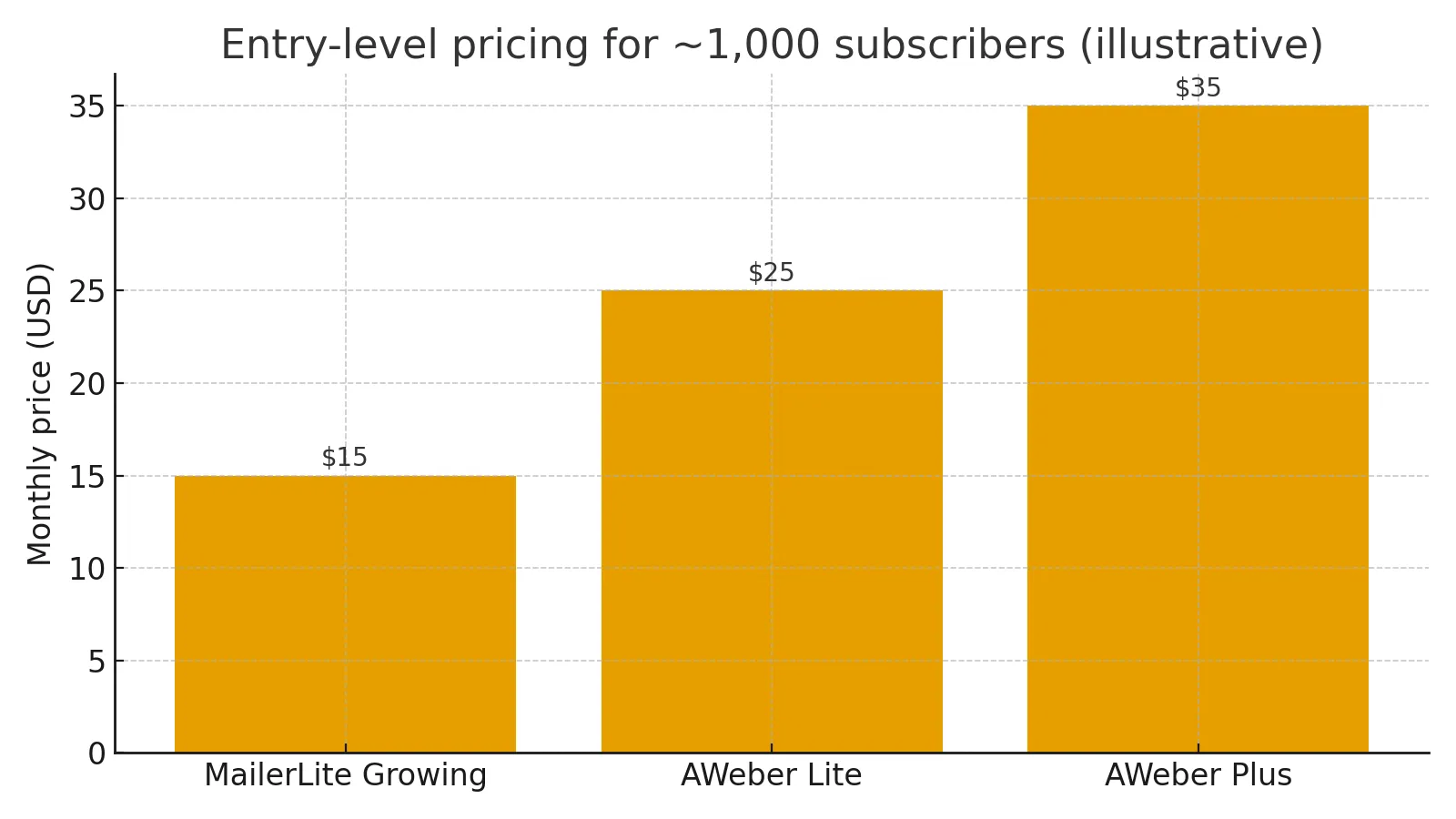
Pricing 2025: which tool is kinder to a solo budget?
MailerLite pricing for solopreneurs
MailerLite has a very simple pricing model in 2025: Free, Growing Business, Advanced, Enterprise. For solo users, you’ll almost always be between Free and Growing Business. :contentReference[oaicite:15]{index=15}
- Free: up to 500 subscribers & 12,000 emails/month, with limited templates and features, but enough to validate your idea. :contentReference[oaicite:16]{index=16}
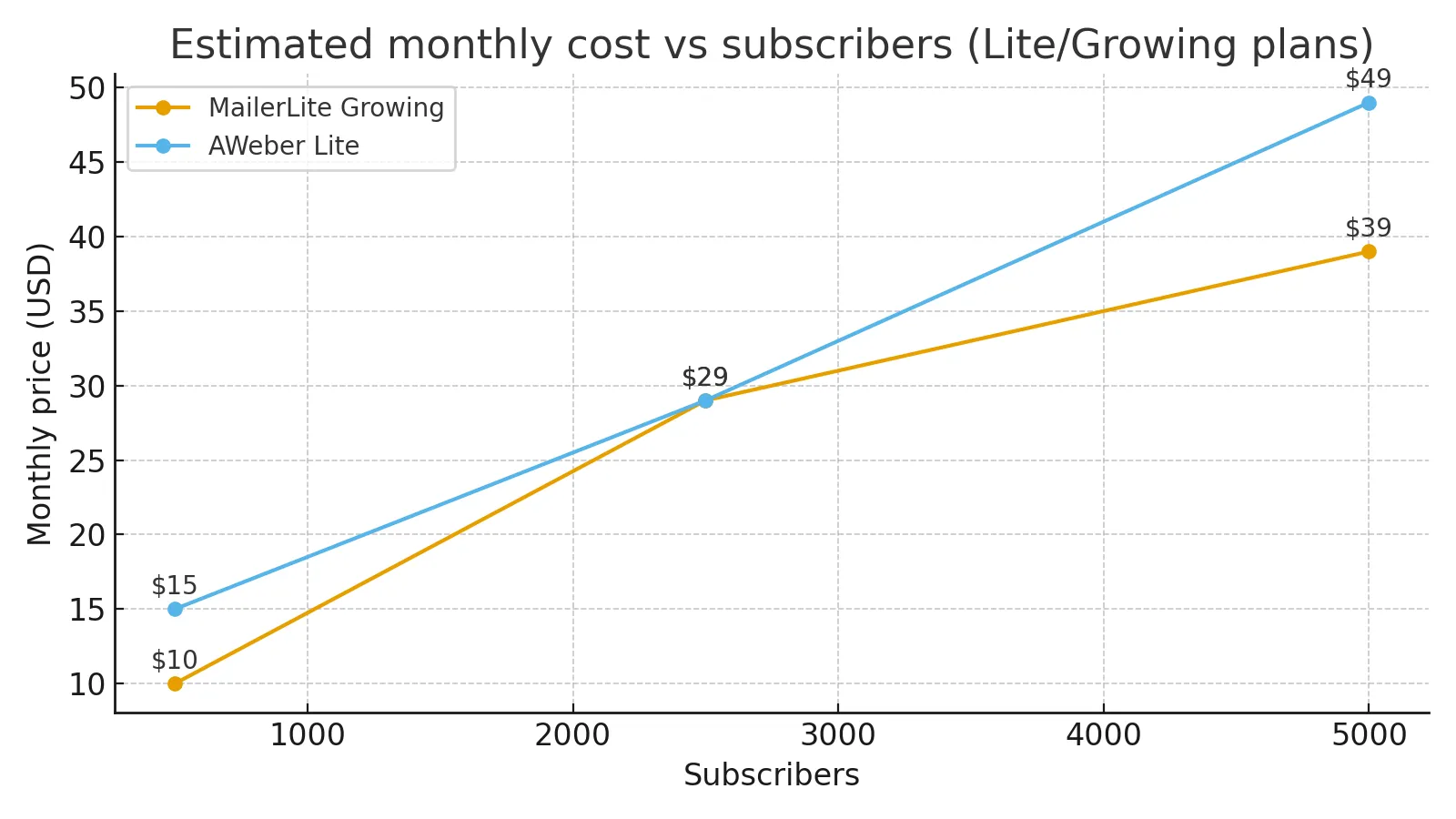
- Growing Business: typically starts around $10–$15/month for small lists, adding more automation, templates and landing page options. :contentReference[oaicite:17]{index=17}
- Advanced: roughly $20+/month, adding advanced features like AI page building, more sites, and extra seats — useful once you grow. :contentReference[oaicite:18]{index=18}
AWeber pricing for solopreneurs
AWeber offers Free, Lite, Plus and Unlimited plans, with clear feature splits: :contentReference[oaicite:19]{index=19}
- Free: up to 500 subscribers, 3,000 emails/month, 1 list, 1 automation and a few landing pages.
- Lite: starts at about $15/month for 500 subscribers; includes 1 list, up to 3 automations and 3 landing pages. :contentReference[oaicite:20]{index=20}
- Plus: around $30+/month and up; unlocks unlimited automations, landing pages and lists, plus better analytics. :contentReference[oaicite:21]{index=21}
Independent pricing reviews frequently note that MailerLite stays cheaper than AWeber once you pass 500–1,000 subscribers, especially when comparing equivalent automation and landing page features. :contentReference[oaicite:22]{index=22}
Rule of thumb: if every email sells even one or two extra products or sessions each month, your email tool should pay for itself very quickly.
On a tight solo budget?
Start with the free plan, then upgrade only when your list actually brings in revenue.
Takes minutes to create a list and send your first welcome email. Cancel or downgrade any time.
Feature matrix: what solopreneurs really need
Instead of comparing every obscure feature, let’s look at what actually matters if you’re a one-person business: landing pages, automations, deliverability, templates and support.
| Feature for solopreneurs | MailerLite | AWeber |
|---|---|---|
| Drag-&-drop email editor | ✓ modern, clean builder :contentReference[oaicite:24]{index=24} | ✓ classic editor with many templates :contentReference[oaicite:25]{index=25} |
| Landing page builder | ✓ strong, with AI on Advanced :contentReference[oaicite:26]{index=26} | ✓ unlimited pages on Plus plan :contentReference[oaicite:27]{index=27} |
| Websites / mini-sites | ✓ built-in website builder for simple sites and blogs :contentReference[oaicite:28]{index=28} | ✗ no full site builder (landing pages only) |
| Automation workflows | ✓ visual builder with templates :contentReference[oaicite:29]{index=29} | ✓ basic workflows; more depth on higher plans, but still not as flexible as some rivals :contentReference[oaicite:30]{index=30} |
| Number of automations on entry paid plan | ✓ multiple automations included on Growing Business :contentReference[oaicite:31]{index=31} | ✓ Lite includes 3 automations, Plus gives unlimited :contentReference[oaicite:32]{index=32} |
| Free plan email limits | 500 subs, 12k emails/mo :contentReference[oaicite:33]{index=33} | 500 subs, 3k emails/mo :contentReference[oaicite:34]{index=34} |
| List & segment limits on entry paid plan | ✓ sensible limits for small lists | ✓ Lite has 1 list and limited segments, Plus unlocks unlimited :contentReference[oaicite:35]{index=35} |
| Template library | Good variety, modern designs :contentReference[oaicite:36]{index=36} | ✓ large, more traditional library :contentReference[oaicite:37]{index=37} |
| Deliverability reputation | Generally strong for SMB/creator use :contentReference[oaicite:38]{index=38} | Long history, solid reputation :contentReference[oaicite:39]{index=39} |
| Support for digital products/memberships | ✓ landing pages + sites make it easy to sell digital offers :contentReference[oaicite:40]{index=40} | Possible via landing pages + third-party tools |
| Target fit for solopreneurs | ✓ frequently recommended for solos & creators :contentReference[oaicite:41]{index=41} | Still popular, but many reviews suggest better-value alternatives for small senders :contentReference[oaicite:42]{index=42} |
| Mobile app / on-the-go checks | Web-first experience; mobile-friendly UI | ✓ app options for checking stats (depending on platform) |
| Learning resources & education | Academy, guides & automation examples for small biz :contentReference[oaicite:43]{index=43} | Blog, webinars and long history of how-to content :contentReference[oaicite:44]{index=44} |
| A/B testing | ✓ subject line/content tests on paid plans :contentReference[oaicite:45]{index=45} | ✓ email A/B testing; landing page testing more limited on some tiers :contentReference[oaicite:46]{index=46} |
| Overall simplicity vs. power balance | Great balance for solo creators | Good basics; can feel dated & pricey |
Already know which feature set feels right?
Open a free account in both tools and rebuild the same welcome automation — you’ll know within a day which one fits your brain.
Start with a simple “new subscriber → welcome → value email → offer” sequence and track results.
Ease of use: which feels better for a one-person team?
Most solopreneurs don’t want to become “email power users” — you want a tool that disappears into the background once set up.
- MailerLite: consistently praised for its clean design, simple navigation and modern builders. The new landing page and website builders use blocks, presets and even AI helpers to get you live quickly. :contentReference[oaicite:47]{index=47}
- AWeber: has a more traditional interface and a huge template library. Some reviewers love the familiarity; others feel it’s slightly dated compared to newer tools. :contentReference[oaicite:48]{index=48}
If you’re comfortable with classic email tools, AWeber won’t feel strange. If you’re starting from scratch or coming from creator platforms like Notion/Gumroad/etc., MailerLite usually “clicks” faster.
Automation & funnels for solopreneurs
Both tools can handle the essentials:
- welcome sequences,
- simple nurture series,
- basic sales/launch campaigns,
- date-based automations (birthdays, anniversaries),
- tag/segment-based follow-ups. :contentReference[oaicite:49]{index=49}
Where they diverge:
- MailerLite:
- Visual automations feel modern and flexible.
- Nice set of automation templates (welcome, onboarding, promos, etc.). :contentReference[oaicite:50]{index=50}
- Pairs naturally with landing pages & websites in the same interface.
- AWeber:
- Free and Lite plans restrict automations (1 automation on free, 3 on Lite). :contentReference[oaicite:51]{index=51}
- Plus/Unlimited remove those caps and add more segmentation and analytics. :contentReference[oaicite:52]{index=52}
- Some third-party reviews still call automation “basic” compared to newer players. :contentReference[oaicite:53]{index=53}
ROI & payback: how quickly do these tools “earn themselves” back?
Let’s say:
- you pay $15–$25/month for your email platform,
- your average product or session price is $50–$150,
- your basic emails add just 2–4 extra sales per month.
In that case, either MailerLite or AWeber should pay for itself within a few weeks, especially once you have a welcome sequence and a simple launch workflow for your offers.
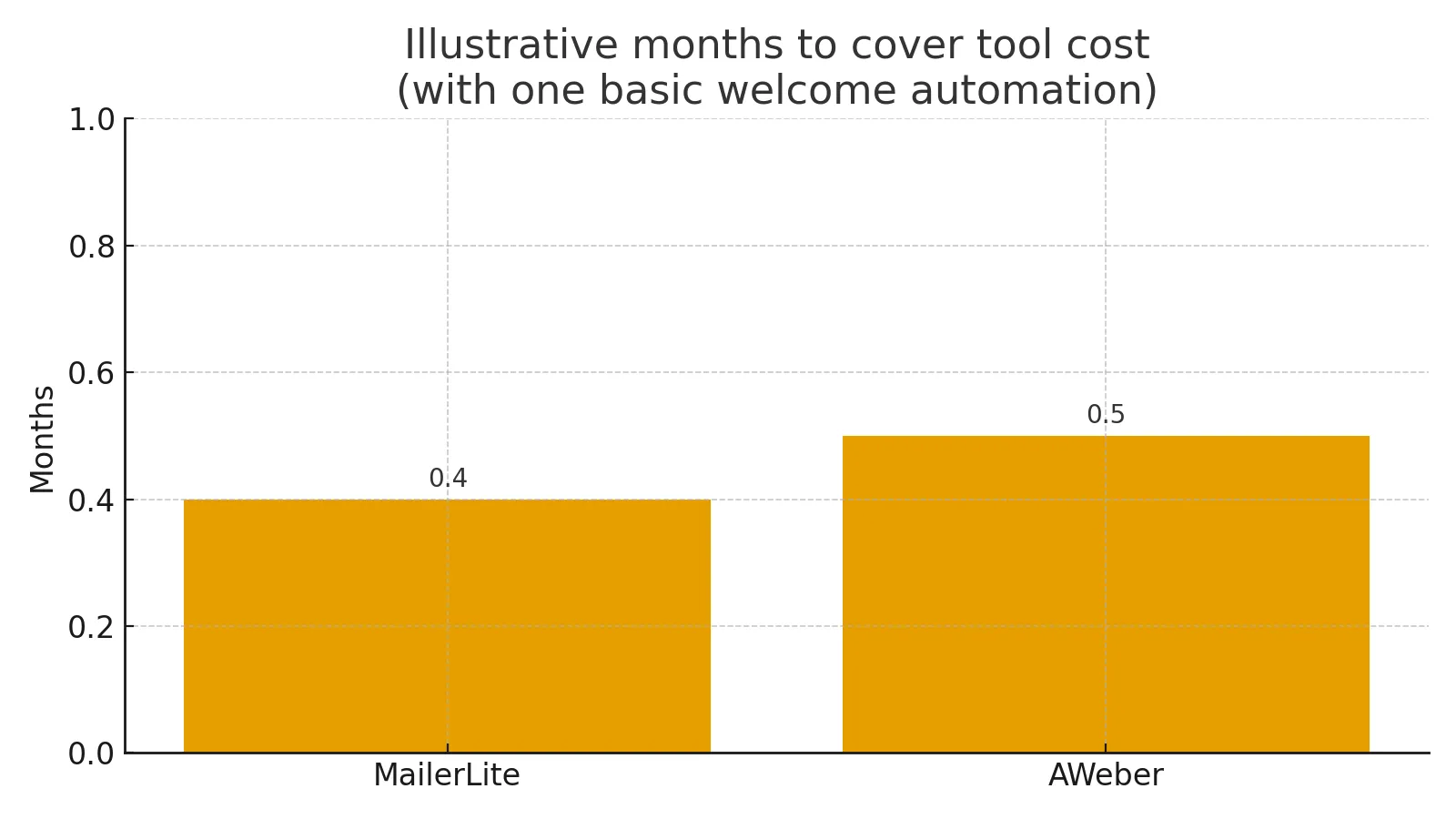
Whichever tool you choose, the real ROI comes from consistent sending — a simple weekly newsletter and a few automated sequences will outperform a “perfect” setup that never goes live.
Ready to test your first ROI-positive automation?
Pick one offer, one list and one 3-email sequence — then watch which platform converts better for you.
You can always keep the winner and cancel the other.
Which should you choose as a solopreneur in 2025?
Choose MailerLite if you are…
- a creator, coach, freelancer or solo founder,
- starting from scratch and want one simple tool for emails, landing pages and a basic site,
- price-sensitive and don’t want your bill to jump the moment you pass 500 subs.
Industry roundups frequently call MailerLite one of the best fits for small businesses and solopreneurs, thanks to its pricing and usability. :contentReference[oaicite:55]{index=55}
Choose AWeber if you are…
- already familiar with AWeber from past projects and like its workflow,
- appreciate phone + 24/7 support and are willing to pay a bit more for it,
- okay with using it primarily as a classic email + landing page tool, not an advanced funnel engine. :contentReference[oaicite:56]{index=56}
Practical next steps: 7-day testing plan
If you’re still unsure, here’s a simple way to decide:
- Day 1–2: Create a free account in both MailerLite and AWeber.
- Day 3: Import the same small test list (with permission) into both.
- Day 4–5: Build the same:
- one landing page,
- one welcome automation (3 emails),
- one broadcast newsletter.
- Day 6–7: Send the newsletter in both tools (to different segments) and track:
- how fast you could build the assets,
- how natural the UI felt,
- open/click results and any issues.
By the end of a week, you’ll know which platform feels like a partner and which feels like extra work.
Turn your audience into a real email list this week.
Pick the tool that feels right for your solo business — then commit to sending one valuable email every week for the next 90 days.
You don’t need perfect funnels to win — just consistent, useful emails that your audience actually wants to read.
FAQs: MailerLite vs AWeber 2025 for solopreneurs
Is MailerLite or AWeber cheaper for small lists?
Both offer free plans up to 500 subscribers, but MailerLite’s free tier allows up to 12,000 emails/month vs AWeber’s ~3,000. On paid tiers, MailerLite’s Growing Business plan is usually cheaper than AWeber Lite/Plus at similar subscriber counts, especially once you pass 500 subscribers. :contentReference[oaicite:57]{index=57}
Which is easier for a non-technical creator?
Most independent reviews find MailerLite’s interface more modern and intuitive, especially for landing pages and automations. AWeber is still straightforward, but can feel more old-school. The best approach is to try building the same welcome flow in both tools and see which feels easier. :contentReference[oaicite:58]{index=58}
Can I sell digital products or services with these tools?
Yes. Both MailerLite and AWeber let you create landing pages for digital products, coaching sessions or memberships. MailerLite’s built-in website/landing page combo is particularly handy for solopreneurs who don’t have a separate site yet, while AWeber can host standalone landing pages that you drive traffic to from social or ads. :contentReference[oaicite:59]{index=59}