
Why Omnisend CRM integrations matter in 2026
If you are running Shopify, WooCommerce or another ecommerce platform, your CRM is no longer just a static database. It is the live heartbeat of your store — every browse, cart, purchase and win-back lives there. The problem? Most teams stitch this together with half-manual exports, clunky ESPs and a spreadsheet “CRM” that breaks the moment they scale.
Omnisend CRM integrations 2026 are designed to fix exactly that. Instead of managing email, SMS and CRM data in separate silos, you turn your ecommerce platform into a living CRM and let Omnisend orchestrate messaging, segmentation and revenue automation on top of it. The result is fewer tools to maintain, clearer reporting and flows that make money while you sleep.
In this professional framework guide, we will walk through how Omnisend connects to your ecommerce stack, how it behaves like a CRM for ecommerce, and how to integrate it with external CRMs if you already run systems like HubSpot or a sales CRM. You will see which integrations are worth implementing on day one, which can wait, and how to build a roadmap that pays for itself in weeks, not months.
If you are short on time and just want the practical playbook, use this article as your technical blueprint, then implement the recommended setup and track revenue directly inside Omnisend and your ecommerce reports.
TL;DR: The Omnisend CRM integrations framework
Here is the short version before we go deep:
- Primary CRM for ecommerce: your ecommerce platform (Shopify, WooCommerce, BigCommerce etc.) becomes the core CRM, with Omnisend reading and enriching that data in real time.
- Omnisend as engagement & intelligence layer: Omnisend handles email, SMS, web push, segments, predictive metrics and revenue attribution.
- Optional external CRM: if you already run HubSpot, a B2B sales CRM or a ticketing system, Omnisend plugs in as your marketing automation and messaging engine.
- Time to value: most brands can launch core flows (Welcome, Browse, Cart, Post-purchase, Replenishment, Win-back) in days and get payback within the first 1–2 months.
For most ecommerce teams, the recommended path is:
- Phase 1: Connect Shopify/WooCommerce and migrate existing lists into Omnisend.
- Phase 2: Turn on core lifecycle flows that rely on CRM-like data (order history, status, categories, RFM behaviour).
- Phase 3: If needed, connect an external CRM for sales, B2B or support use cases, letting Omnisend stay the customer engagement brain.
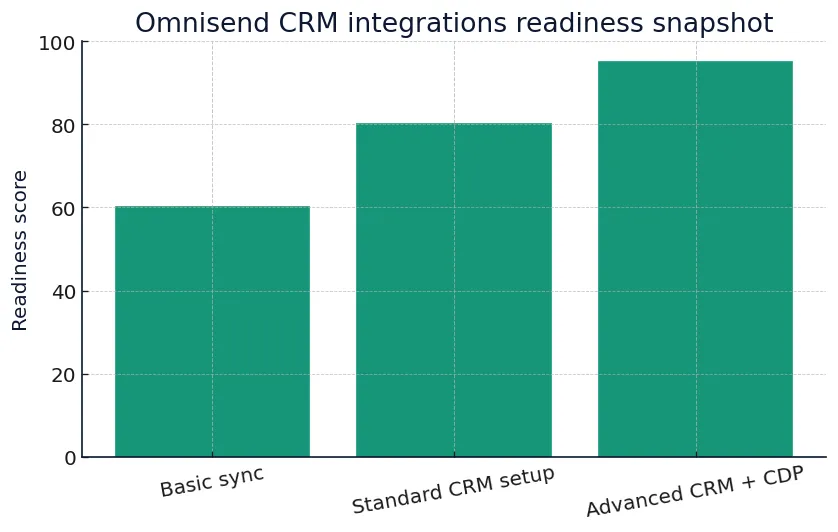
Vir: Omnisend documentation & pricing pages, dostopano 4.12.2025.
CTA: Launch Omnisend CRM integrations without extra dev work
Once you understand the core framework, the fastest path is to implement it on top of your existing ecommerce platform and let Omnisend handle the heavy lifting.
Quick comparison: Omnisend CRM integrations vs generic ESP + manual CRM
| Scenario | Omnisend CRM integrations | Generic ESP + manual CRM |
|---|---|---|
| Data source for customers | Real-time ecommerce events | Manual exports, CSV uploads |
| Order history available in flows | ✓ Native | ✗ Often missing |
| Multiple stores / regions | ✓ Supported via integrations | ✗ Workarounds only |
| Unified profile (email + SMS + behaviour) | ✓ Single customer view | ✗ Split across tools |
| Cart & checkout event depth | ✓ Product, value, timestamp | ✗ Limited or absent |
| Replenishment & subscription logic | ✓ Based on orders & attributes | ✓ basic, manual setup |
| Segmentation by RFM or lifecycle | ✓ Built for ecommerce | ✓ generic, less precise |
| Time to launch core automations | Days | Weeks–months |
| Cross-channel orchestration (email + SMS) | ✓ Native SMS & email | ✓ requires extra tools |
| Revenue attribution & reporting | Flow-level & campaign-level revenue | Fragmented across tools |
Pricing pages and feature sets change often — always confirm live in your Omnisend account before final decisions.
Features matrix: What Omnisend covers in a CRM-style setup
| Capability | Omnisend | Typical ESP |
|---|---|---|
| Real-time ecommerce events (Shopify/Woo) | ✓ | ✓ basic |
| Contact timeline (emails, SMS, orders) | ✓ | ✗ or partial |
| Multiple lists & tags as CRM fields | ✓ | ✓ limited structure |
| Sync to external CRM (HubSpot / sales) | ✓ via integrations & APIs | ✗ or manual |
| Lifecycle stages (new, active, lapsed) | ✓ ecommerce-focused | ✓ generic |
| Dynamic product recommendations | ✓ | ✓ manual setup |
| Cross-channel journeys (email + SMS) | ✓ native SMS orchestration | ✓ requires extra tools |
| Behaviour-based segments (category, spend) | ✓ deep filters | ✗ or shallow filters |
| RFM scoring or lookalike logic | ✓ ecommerce-focused tools | ✗ usually missing |
| Transactional messaging (order / shipping) | ✓ via ecommerce integrations | ✓ requires dev |
| Consent & preferences management | ✓ | ✓ |
| Attribution by flow & channel | ✓ | ✗ or limited |
| Granular permission for teams / agencies | ✓ | ✓ basic roles |
| APIs & webhooks for custom CRM | ✓ documented APIs | ✗ or limited access |
| Pre-built ecommerce workflows | ✓ Omnisend strength | ✓ generic templates |
| All-in-one view for marketing + revenue | Single Omnisend view | Multiple dashboards |
Automation = revenue while you sleep. Omnisend CRM integrations let you deploy lifecycle flows once and keep selling daily.
How Omnisend behaves like an ecommerce CRM
Most ecommerce brands ask a simple question: “Do we really need a separate CRM if Omnisend already centralises email, SMS and behaviour?” The honest answer is that Omnisend CRM integrations 2026 are usually enough to cover 80–90% of the day-to-day CRM scenarios for B2C ecommerce.
Instead of forcing you into a separate CRM user interface, Omnisend sits directly on top of your ecommerce data. Every product view, cart, order and unsubscribe becomes a signal you can use to build segments, journeys and revenue reports. For many DTC and Shopify-first brands, this replaces the need for a dedicated CRM — especially if your main goal is driving repeat purchases and higher lifetime value rather than managing large outbound sales teams.
For a deeper dive into how Omnisend plugs into WooCommerce and behaves as your “store-native CRM”, see our implementation guide:
Omnisend WooCommerce setup.
Core data model: what Omnisend syncs from your store
When you connect Shopify or WooCommerce to Omnisend, you are effectively turning your store into a CRM with a marketing brain on top. At minimum, Omnisend pulls:
- Customer profiles (name, email, phone, address, tags).
- Order history (products, totals, discounts, timestamps).
- Behaviour events (product views, cart/checkout, browse history).
- Consent and preferences (email, SMS, channel opt-ins).
This means that every automation flow you build — from Welcome and Browse Abandonment to Win-back — has access to rich CRM-level data without manual syncing. You can build segments like “VIP customers who ordered 3+ times in the last 180 days and browsed a specific category in the past week” in a few clicks, instead of waiting for exports from another tool.
Pricing & CRM integrations: what does it cost?
When you evaluate Omnisend, you should not only ask “What is the monthly price?” but “How much CRM value do we get per 1,000 contacts, and how fast does it pay back?” Because Omnisend combines email, SMS and CRM-style data, the cost per revenue-generating flow is usually lower than a stack of separate tools.
At a high level, you will consider:
- Base plan: Email + automation + basic reporting.
- SMS credits: either pay-as-you-go or monthly SMS bundles linked to your plan.
- List size: how pricing scales with contacts and how many CRM-like events you can use.
For up-to-date plan details, always review the official
Omnisend pricing page
before locking in your budget.
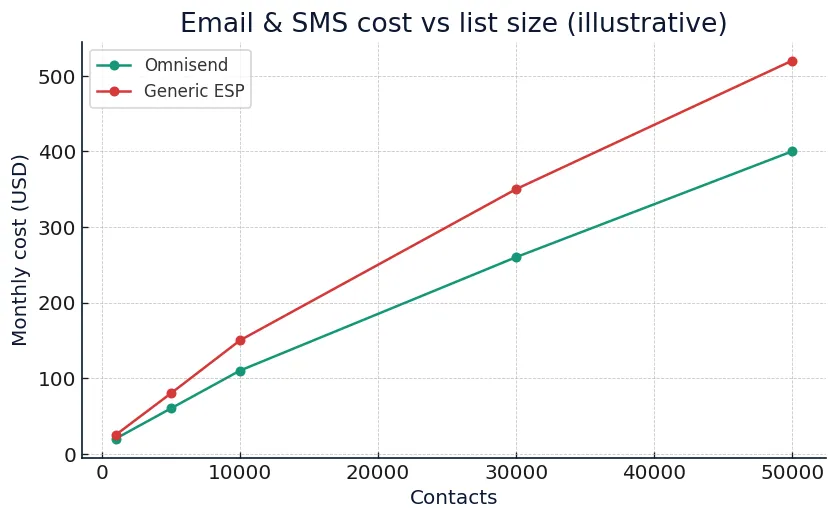
Vir: Omnisend pricing assumptions, dostopano 4.12.2025.
Where Omnisend wins on total CRM cost
Because Omnisend integrates CRM-like capabilities directly into your marketing tool, you avoid paying for:
- Separate CRM licenses just to access order or contact history for campaigns.
- Custom integrations between CRM, ESP and SMS provider.
- Manual work to keep lists in sync across tools.
If you want a detailed breakdown of email + SMS pricing, including SMS unit costs and bundle logic, read our dedicated guide:
Omnisend pricing 2026: real email & SMS costs.
How to connect Omnisend to existing CRMs (HubSpot, sales CRMs, support)
Some ecommerce brands already use a dedicated CRM for wholesale, B2B or sales-led motions. In that case, Omnisend CRM integrations 2026 let you plug Omnisend in as your engagement engine while your sales or support teams continue working in their CRM of choice.
Typical patterns include:
- HubSpot or similar CRM for B2B — sales reps log calls and deals in HubSpot, while Omnisend handles ecommerce email & SMS automation for the same customers.
- Ticketing tools for support — your support system stores tickets, but Omnisend can react to status changes (e.g. send a satisfaction survey or win-back after a resolved complaint).
- CDP or data warehouse — if you centralise data in a warehouse, Omnisend can push marketing events and revenue back for unified reporting.
In all of these cases, Omnisend remains the place where you design and monitor campaigns and flows, while your CRM stays the system of record for sales or support-specific tasks. This split keeps your stack lean and avoids double data entry.
Automation blueprint: using CRM data inside Omnisend flows
Once your ecommerce platform is integrated and your CRM fields are flowing into Omnisend, the real power comes from automation. A simple starting blueprint looks like this:
- Welcome series: triggered by signup, segmented by acquisition source and key interest tags.
- Browse abandonment: triggered by view events, filtered by product category and customer value.
- Cart & checkout abandonment: triggered by cart or checkout events with dynamic product blocks.
- Post-purchase & review request: triggered by order status, using product and spend data.
- Replenishment: triggered X days after purchase for consumables, filtered by previous orders.
- Win-back: triggered when customers fall into lapsed lifecycle stages based on recency and frequency.
Each of these flows uses CRM-like information — what people bought, how often, how much they spend — without you ever logging into a separate CRM. Omnisend reads that data through integrations and makes it available directly inside the automation builder.
ROI & payback: what Omnisend CRM integrations deliver
The question every ecommerce operator cares about: “How soon does this pay back?” In practice, brands that implement Omnisend CRM integrations quickly see:
- Higher automation revenue: more revenue from Welcome, Browse, Cart and Win-back flows driven by CRM data.
- Better segmentation: fewer batch-and-blast campaigns, more targeted sends and healthier deliverability.
- Lower tool overhead: fewer logins, fewer sync errors and a clearer picture of what actually works.
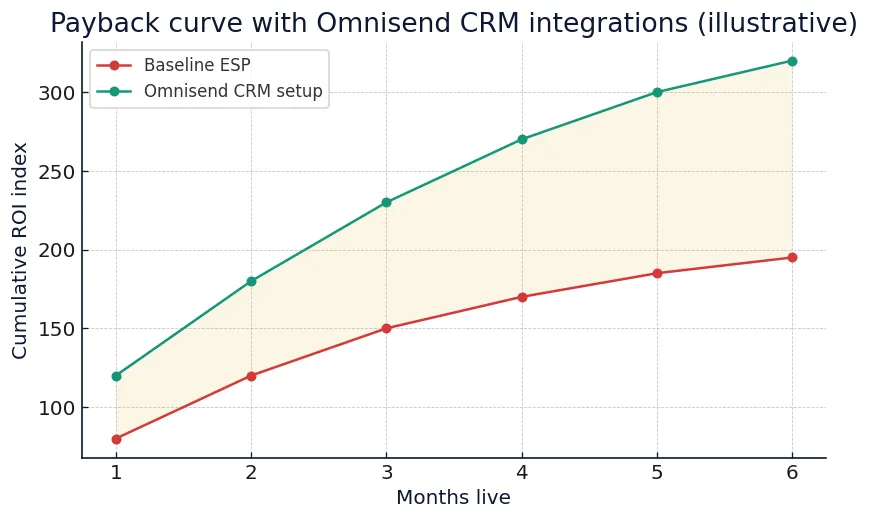
Vir: modelni primer za ecommerce brand, dostopano 4.12.2025.
Which setup should you pick?
Use this as a quick decision checklist:
- If you are Shopify-first or WooCommerce-first: treat Omnisend + your store as your primary CRM for ecommerce. You probably do not need a separate CRM tool to manage repeat buyers.
- If you run B2C ecommerce + B2B or wholesale: let Omnisend own lifecycle marketing and plug it into your sales CRM for deals and wholesale processes.
- If you already run a complex CRM stack: simplify by moving all email & SMS lifecycle flows into Omnisend and keep only the CRM features you truly use.
For a broader ecommerce strategy that includes pricing, automation and content, see our guide
Ecommerce email strategy 2026
and our main
Omnisend review & overview.
FAQs about Omnisend CRM integrations 2026
Do I still need a separate CRM if I use Omnisend?
For most B2C ecommerce brands, Omnisend + your ecommerce platform will cover the majority of CRM needs: contact history, behaviour, orders and lifecycle segmentation. You might still want a dedicated CRM if you run a sales team, manage long B2B cycles or need advanced deal pipelines — but for pure ecommerce, Omnisend is usually enough.
How long does it take to get value from Omnisend CRM integrations?
Most brands that already have Shopify or WooCommerce live can connect Omnisend, import contacts and launch core flows within a few days. Real revenue impact typically shows up within 4–8 weeks, depending on traffic and list size.
What if our team is small and not technical?
Omnisend’s integrations and templates are built specifically for ecommerce marketers who do not have a full-time developer. You can use pre-built workflows, drag-and-drop builders and unified segments without custom code. For more advanced use cases, you can always extend with APIs later.
How does Omnisend handle SMS inside the CRM framework?
SMS is a native channel in Omnisend, which means consent, phone numbers and SMS performance all live inside the same profile as email data. You can design flows that move between email and SMS based on behaviour, lifecycle stage and value — no need for a separate SMS provider or CRM integration.
Can I migrate from another ESP without losing CRM data?
Yes. You can import existing tags, segments and custom fields into Omnisend, then let the ecommerce integration continue building richer profiles over time. The key is to map your current CRM and ESP fields into a clean Omnisend data structure during migration.
Final verdict: Omnisend as your ecommerce-native CRM engine
If you are looking for a way to centralise CRM-style data, email and SMS without building a complex stack, Omnisend CRM integrations 2026 are one of the most pragmatic choices. You get a strong ecommerce-native data model, powerful lifecycle automation and clear revenue reporting — all in one place.
For most Shopify and WooCommerce brands, the winning move is to treat Omnisend + your store as the primary CRM for customer marketing, while keeping external CRMs only where they truly add value (wholesale, B2B sales, complex service workflows). This keeps your stack lean and your team focused on what matters most: flows that ship, campaigns that convert and revenue you can clearly attribute.