
Updated: 27.10.2025 · Reading time: ~18–22 min
You’re busy. You want funnels that ship quickly, make money reliably, and don’t require a team of marketing ops specialists. MailerLite automation templates 2025 are designed exactly for that: opinionated, pre-configured workflows you can launch in an afternoon, then iterate weekly. This guide gives you everything you need to decide fast—what each plan includes, how pricing scales by contacts, and where automation returns show up first. We’ll also share a practical rollout order, a deep features matrix, and simple ROI math you can adapt to your store.
Automation = revenue while you sleep. Set once, sell daily.
TL;DR verdict
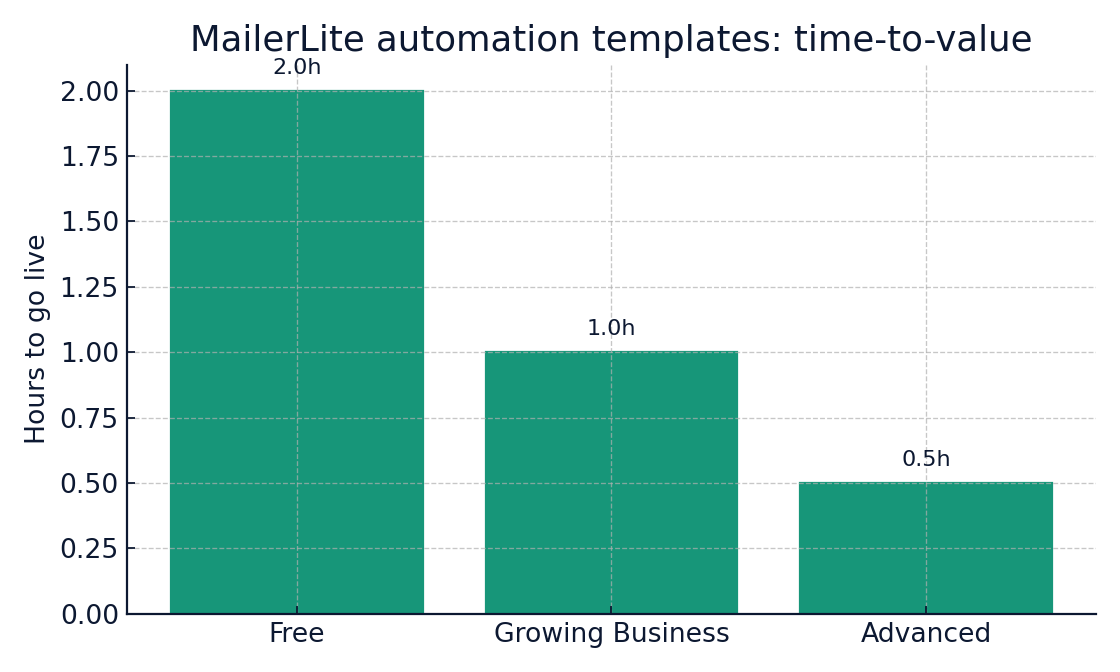
- ✓ Time-to-value: most teams can take a template (Welcome, Cart, Post-purchase), swap brand copy, connect the store, and go live in under 2 hours.
- ✓ Clarity: pricing scales with contacts, not number of automations. That keeps planning simple.
- ✓ Who it’s for: Shopify/Woo stores, creators and coaches who value clean UX and practical automation depth.
- ✗ Trade-offs: if you need very advanced multi-trigger/branching or enterprise analytics, expect to use higher tiers or complementary tools.
Validate revenue in weeks, not months. No dev team required — ready ecommerce flows.
Takes minutes to connect Shopify/Woo. Cancel anytime.
Pricing pages change often — confirm live before you decide.
How MailerLite’s automation templates work
MailerLite’s templates are pre-built workflows that combine a trigger, timing, and content structure so you can deploy proven journeys without reinventing the wheel. Each template includes suggested delays, email counts, and branching examples. You can customize copy, images, products, and conditions—while keeping the guardrails that prevent common mistakes (like sending the wrong incentive too soon).
Key template families:
- Welcome series: fires on signup, delivers promised value (lead magnet or discount), asks a simple preference question (one-click poll), and introduces your positioning. Goal: convert new subscribers into first-time buyers and tag for personalization.
- Abandoned cart: multi-touch reminder with dynamic product blocks and social proof. Typical rhythm: quick reminder → benefit-led nudge → expiring incentive (if margin allows). Goal: recover checkouts without training buyers to wait for discounts.
- Post-purchase: onboard customers to the product, reduce returns with education, then request a review and offer a cross-sell. Goal: increase product satisfaction and LTV with tasteful timing.
- Win-back: detects lapsing subscribers (e.g., 60/90 days inactivity) and offers helpful content first, then a soft incentive. Goal: reactivate dormant revenue before churn is permanent.
- Browse abandonment / product interest: leverages viewed products to trigger relevant follow-ups (where your store integration provides these events). Goal: move “window shoppers” forward without over-sending.
Because automations run continuously, the impact compounds. A single weekend of setup can produce revenue weekly with minor maintenance—mostly testing subject lines, timing, and incentive thresholds.
Quick plan comparison
This table focuses on automation-relevant differences that affect launch speed and performance.
| Capability | Free | Growing Business | Advanced |
|---|---|---|---|
| Automation templates | ✓ | ✓ | ✓ |
| Multi-step workflows | ✓ basic | ✓ | ✓ |
| Ecommerce triggers (add-to-cart, purchase) | ✗ | ✓ | ✓ |
| Conditional branching | ✓ limited | ✓ | ✓ |
| A/B testing (subject/content) | ✗ | ✓ | ✓ |
| Auto-resend | ✗ | ✓ | ✓ |
| Email sends / month | ✓ capped | ✓ unlimited | ✓ unlimited |
| Users / seats | 1 | 3 | Unlimited |
| Support availability | ✗ | ✓ hours vary | ✓ priority |
| Websites / landing pages | ✓ caps apply | ✓ unlimited | ✓ unlimited |
| Transactional messages (via integrations) | ✗ | ✓ | ✓ |
| Advanced automation (multiple triggers) | ✗ | ✓ basic | ✓ |
Pricing: what you’ll actually pay
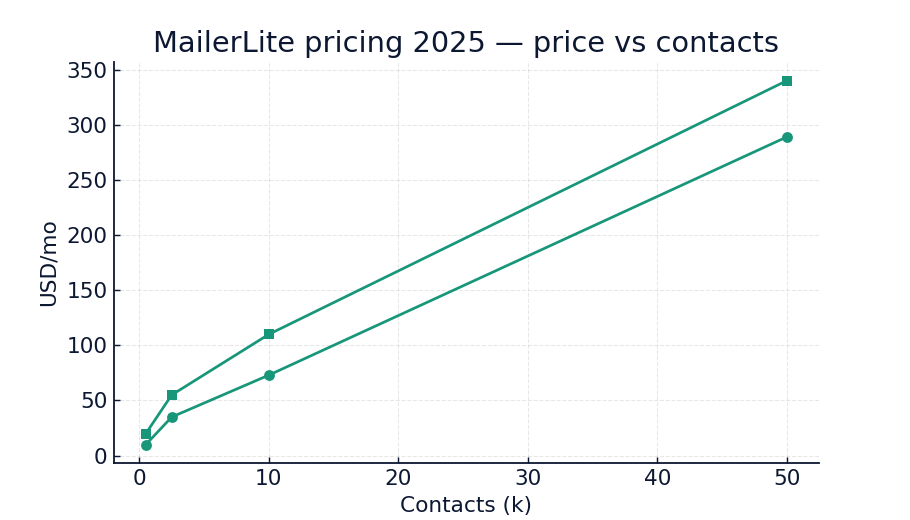
MailerLite charges by subscriber count. That means you can run multiple automations without paying per-workflow fees. For ballpark planning, the Growing Business tier tends to start around $10/month for 500 contacts, hitting roughly $25 at 2,500, $39 at 5,000, $77 at 10,000, and around $125 at 20,000. The Advanced tier adds more seats, support, and analytics depth. Always validate live prices before checkout.
Budget signal: if you rely on ecommerce triggers and A/B testing inside automations, plan on Growing Business or above, especially beyond 10k contacts. If your list is tiny and mostly newsletters, Free can be fine—but you’ll likely outgrow it once you enable multiple revenue automations.
Validate revenue in weeks, not months. No dev team required — ready ecommerce flows.
Takes minutes to connect Shopify/Woo. Cancel anytime.
The fastest funnels to launch (copy this order)
Roll out in layers. This sequence front-loads the highest “revenue per hour spent” and keeps complexity under control:
- Welcome series (2–3 emails, 7–10 days):
- Email 1: deliver the promised incentive or lead magnet. Reaffirm your core value prop in one sentence.
- Email 2: product benefits or top use cases; one customer quote. Ask a single-click preference (e.g., “What do you want more of?”).
- Email 3: gentle nudge to first purchase or deeper content pillar. No aggressive discounts unless your economics require it.
- Abandoned cart (2–3 steps over 24–72 hours):
- Reminder: short + visual, dynamic products. Include shipping/returns clarity to reduce friction.
- Social proof: reviews, UGC, quick FAQ.
- Incentive (optional): small, time-bound offer (only if margin allows). Make it rare to avoid conditioning.
- Post-purchase (education → review → cross-sell):
- Usage & care: reduce returns with real guidance; link to helpful how-to.
- Review request: after delivery window. Keep it light, first-name personalization only.
- Cross-sell: offer a relevant accessory/consumable; avoid clutter.
- Win-back (60/90-day lapse):
- Content-first: “we saved your favorites” or a buyer’s guide refresh.
- Offer (optional): only after engagement; small and time-boxed.
Features Matrix (22 rows)
The matrix below focuses on automation-relevant depth. ✓ is green; when a ✓ has a limitation, the descriptor is red; ✗ is red.
| Feature | Growing Business | Advanced |
|---|---|---|
| Automation templates gallery | ✓ | ✓ |
| Drag-and-drop workflow editor | ✓ | ✓ |
| Multiple triggers per workflow | ✓ basic | ✓ |
| Conditional branching & filters | ✓ | ✓ |
| Event-based ecommerce triggers | ✓ | ✓ |
| Abandoned cart blocks (dynamic) | ✓ | ✓ |
| Product recommendations (manual) | ✓ manual curation | ✓ smarter options |
| A/B testing inside automations | ✓ limited types | ✓ broader |
| Send time controls & delays | ✓ | ✓ |
| Auto-resend & resurface logic | ✓ | ✓ enhanced |
| Behavioral segments (click/view) | ✓ | ✓ |
| RFM-style targeting (simple) | ✓ basic | ✓ deeper |
| Custom fields & merge tags | ✓ | ✓ |
| Webhooks / integrations | ✓ select | ✓ broad |
| Deliverability setup guides (SPF/DKIM/DMARC) | ✓ | ✓ priority help |
| Analytics depth | ✓ basic depth | ✓ deeper |
| Attribution clarity (UTM, last-touch) | ✓ simple | ✓ improved |
| Seats / users | 3 | Unlimited |
| Permissions & roles | ✓ basic | ✓ granular |
| SSO / advanced security | ✗ | ✓ |
| Landing pages / sites | ✓ unlimited | ✓ unlimited |
| Support SLAs / priority | ✓ chat | ✓ priority |
ROI & payback: simple math you can adapt
Let’s run a conservative example for a small store:
- List: 10,000 contacts
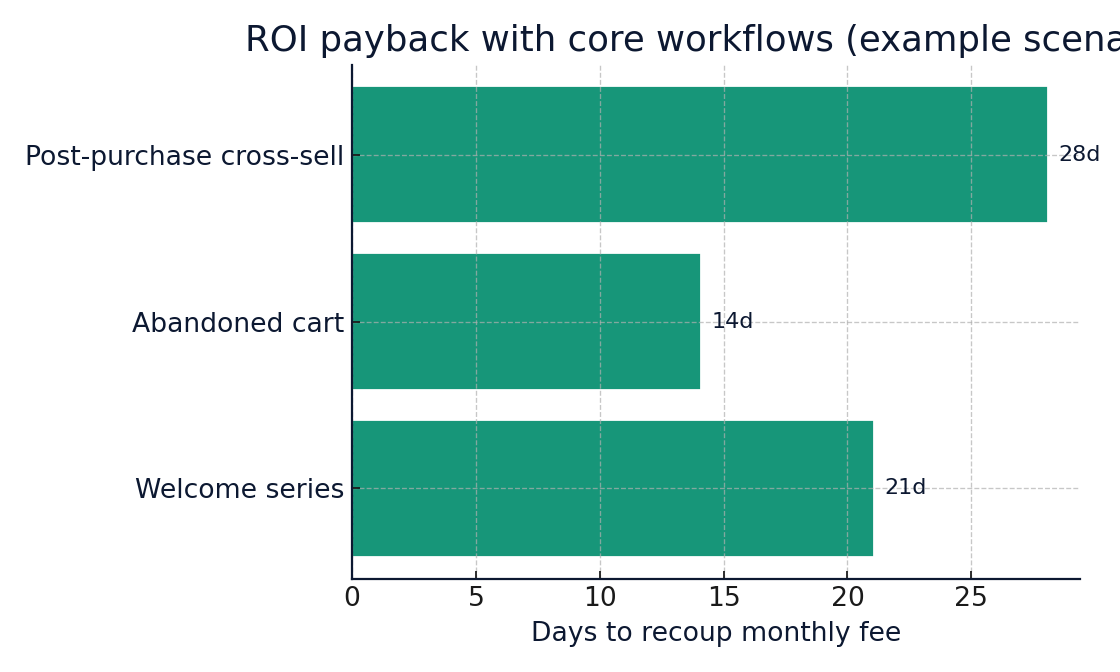
- Welcome series: 1.5% of new signups convert; AOV $40 → incremental monthly revenue depends on signup volume (assume 1,000 new signups/month → ~15 orders → $600)
- Abandoned cart: recover +4% of otherwise lost carts; if you have 600 carts/month with 40% baseline recovery, +4% equals +24 orders → ~$960
- Post-purchase cross-sell: +3% attach on 300 orders → 9 orders → ~$360
That already suggests ~$1,920/month in incremental revenue from three workflows. If your plan costs ~$77/month at 10k contacts, payback is comfortably within a week or two. Your exact numbers will vary by traffic, offer, margins and niche—but the direction holds: a few evergreen automations often cover the subscription multiple times over.
Setup checklist (30–90 minutes)
- Connect your platform: Shopify or WooCommerce. Verify domain and set up SPF/DKIM for inbox placement.
- Import contacts: only consented emails; map key fields (first name, signup source, lifecycle stage).
- Load templates: Welcome, Abandoned Cart, Post-purchase. Swap copy/images; confirm brand colors and fonts.
- Segments: new vs returning, high-AOV, engaged 90-day, unengaged 180-day.
- QA run: trigger tests, coupon validity, mobile previews, time zones, and product feed mapping.
- Ship v1: publish with conservative sending windows. Add simple A/B on subject lines.
- Weekly iteration: scale incentive timing only if recovery stalls; test social proof placement and send delays.
Best practices & pitfalls
- Don’t over-discount in cart flows: try benefit-led nudges and proof before incentives. Protect LTV.
- Ask one question at a time: the best segmentation starts with one preference click, not a survey.
- Guard against fatigue: cap total sends per subscriber per week; exclude recent buyers from aggressive promos.
- Measure properly: add UTMs; compare automation revenue to a like-for-like baseline window, not campaign blasts.
- Iterate the boring bits: subject lines, hero images, CTA clarity—these win more revenue than exotic branching.
Validate revenue in weeks, not months. No dev team required — ready ecommerce flows.
Takes minutes to connect Shopify/Woo. Cancel anytime.
FAQ
Are automations limited by workflow count? No. Pricing scales by subscribers, not number of workflows. Higher plans unlock deeper features and support.
Can I run templates without a store? Yes. You can run lead capture and nurture funnels. Ecommerce triggers need a storefront integration.
What if my list is small? Start on Free or Growing Business. Launch Welcome + Cart; add Post-purchase once orders ramp. You can always upgrade as contacts grow.
How do I avoid training buyers to wait for discounts? Use proof and benefit-led messaging first; keep incentives small, rare, and time-boxed.
How many emails per workflow? Often 2–3 is enough. Add a fourth only when data proves it lifts conversions without hurting engagement.
References
- Official pricing: MailerLite pricing
- Automation overview: MailerLite automation
- Template gallery: Automation templates
Final verdict
MailerLite automation templates (2025) are a smart fit for teams that want real revenue quickly without adding operational drag. You’ll trade some enterprise-level complexity for speed and clarity—but for most Shopify/Woo businesses, that’s exactly the point. Ship the three core flows, monitor weekly, and let the compounding do the rest.
Next reads:
MailerLite Vs Omnisend
MailerLite Review