
Omnisend automation templates for WooCommerce 2026: full setup guide
Omnisend automation templates for WooCommerce 2026 are the fastest, lowest-friction way to launch revenue-ready email and SMS flows without code. If you run a WooCommerce store, these ecommerce-specific templates automate welcomes, abandoned carts, post-purchase messages, and confirmations in minutes — so you focus on products and growth, not manual sending.
This full setup guide shows you how to:
- Connect WooCommerce ↔ Omnisend step-by-step
- Launch the must-have Omnisend automation templates for WooCommerce 2026
- Customize flows for higher AOV and repeat purchases
- Understand real plan costs (email + SMS) and limits
- Calculate ROI and payback with a simple model you can copy
TL;DR verdict
Pick Omnisend for WooCommerce if you want plug-and-play workflows (Welcome, Abandoned Cart, Post-purchase) with email + SMS in one builder — no dev team needed.
Skip for now only if your list is tiny (<500 contacts) and you’re determined to keep everything free until you grow. The fastest launch path: connect plugin → pick template → apply branding → test → activate. Keep this phrase in your checklist: Omnisend automation templates for WooCommerce 2026.
Pricing pages change often — confirm live before subscribing (and double-check SMS rates by country).
Time to first automated revenue
Setup effort →
Time to value
Manual build
Omnisend templates
Quick comparison
| Omnisend + WooCommerce | Generic ESP (no native Woo) | |
|---|---|---|
| Install & connect | ✓ 1-click plugin + OAuth | ✗ manual API work |
| Product & cart sync | ✓ auto, continuous | ✗ exports or custom code |
| Prebuilt workflows | ✓ cart, welcome, post-purchase | ✗ often none |
| Email + SMS in one flow | ✓ unified builder | ✗ needs extra tool |
| GDPR checkout opt-in | ✓ consent checkbox | ✗ DIY |
| A/B testing | ✓ built-in | ✗ limited |
| Live visitor tracking | ✓ real-time | ✗ none |
| Segmentation by LTV/AOV | ✓ purchase-based | ✗ basic filters |
| Setup time | ≈ 30–60 min | 2–5 h |
| Support | ✓ 24/7 chat & email | ✗ slower tiers |
| Scales with contacts | ✓ predictable tiers | ✗ varies widely |
| Total cost of ownership | ✓ fewer add-ons | ✗ add-ons & dev time |
What each platform includes
| Feature | Supported | Notes |
|---|---|---|
| WordPress plugin install | ✓ | “Omnisend for WooCommerce” |
| Woo product catalog sync | ✓ | auto/continuous sync |
| Order & customer history import | ✓ | backfill past orders |
| Welcome series template | ✓ | ready to launch |
| Abandoned cart template | ✓ | email + optional SMS |
| Post-purchase upsell | ✓ | cross-sell blocks |
| Order/shipping confirmations | ✓ | customizable branding |
| Browse abandonment | ✓ | site visitors who didn’t buy |
| Email + SMS in single workflow | ✓ Pro | regional SMS limits apply |
| Signup forms & popups | ✓ | forms, flyouts, gamified |
| Segmentation by spend/frequency | ✓ | LTV, AOV, recency |
| A/B testing (emails/SMS) | ✓ | subject lines & content |
| Reports & attribution | ✓ | revenue, orders, ROI |
| Web push notifications | ✓ | optional channel |
| API & webhooks | ✓ | advanced triggers |
| Custom fields / loyalty data | ✓ | via API/integrations |
| GDPR checkout opt-in | ✓ | checkbox on checkout |
| Multi-language flows | ✓ | separate flows per locale |
| Account manager | ✓ higher tiers | for high volume |
| Extra SMS fees after quota | ✓ | check country rates |
| 24/7 support | ✓ | chat & email |
Pricing (2026): plans & real-world costs
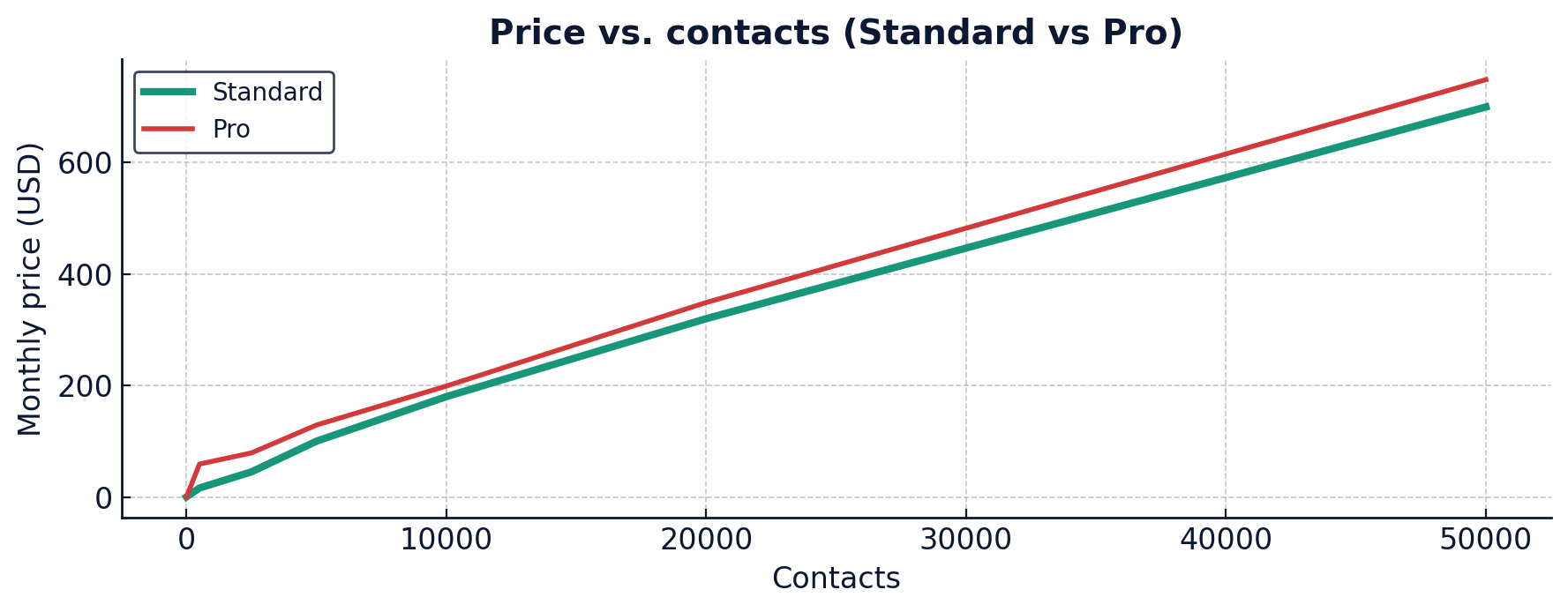
Typical tiers:
- Free — starter limits (e.g., ~250 contacts, ~500 emails/mo)
- Standard — from ~$16/mo, scales by contact count
- Pro — from ~$59/mo, adds SMS credits + advanced reporting
SMS costs depend on destination — plan ahead for overages if you exceed included credits.
Automation templates & full setup
After connecting WooCommerce, go to Omnisend → Automations → New workflow. You’ll find templates for the entire ecommerce journey — and these are exactly the Omnisend automation templates for WooCommerce 2026 that speed up launch:
- Welcome series — engage new subscribers instantly
- Abandoned cart — recover lost sales via email (+ SMS on Pro)
- Order & shipping confirmations — transactional + cross-sell
- Post-purchase upsell — increase AOV and repeat orders
- Browse abandonment — remind product viewers to return
- Win-back / Re-engagement — reactivate lapsing customers
Connect WooCommerce → Omnisend (step-by-step)
- In WordPress, go to Plugins → Add New, search “Omnisend for WooCommerce”, then Install → Activate.
- Click Connect your store to Omnisend, sign in or create an account.
- Approve permissions (orders, customers, products) to enable syncing.
- Verify that products, customers, and order history populate in Omnisend.
- (Optional) Enable the marketing opt-in checkbox at checkout for GDPR-compliant consent.
Customize templates for higher conversions
- Add social proof (reviews, UGC) and highlight best-sellers
- Use dynamic product blocks from the cart/order context
- Split high-value buyers to a VIP-style upsell series
- Test subject lines, send-times, and SMS vs email steps
- Use urgency sparingly (limited-time incentives, back-in-stock)
Automation = revenue while you sleep. Set once, sell daily.
ROI & payback: simple model
ROI = (Extra revenue − Tool cost) / Tool cost
Example: 5,000 contacts → Standard ≈ $100/mo.
Abandoned cart recovers ~50 sales × $50 = $2,500
Other flows add ≈ $500 → Extra revenue ≈ $3,000
ROI = (3,000 − 100) / 100 = 2,900% (≈ same-month payback)
ROI payback curve (after activation)
Payback ~1–2 weeks
Which one should you pick?
- Choose Omnisend + WooCommerce if you want ready-made revenue flows, unified email+SMS, and fewer plugins to maintain.
- Stick with a free ESP only if you’re <500 contacts and testing the waters — revisit Omnisend once growth starts.
- Need advanced cases (headless, loyalty data, custom triggers)? Use Omnisend’s API & webhooks to extend flows.
FAQs
How do I add GDPR-compliant consent in WooCommerce?
Does SMS work in my country?
Can I run email + SMS in the same automation?
What if I already have historical orders?
What’s the fastest way to start?
Final verdict
Omnisend automation templates for WooCommerce 2026 deliver fast time-to-value: connect, customize, and launch two or three core flows to start generating incremental revenue within days. As your list grows, upgrade from Standard to Pro to add SMS steps and deeper reporting. It’s a practical path to “set once, sell daily.”
Helpful:
Omnisend pricing ·
Automation templates overview ·
WooCommerce plugin/setup docs