
Omnisend for beginners 2025: your first email + SMS campaign
A step-by-step Shopify/Woo guide to launch your first revenue-ready flows, email, and SMS in under 60 minutes.
TL;DR — Quick start
- Connect store: Install Omnisend → connect Shopify/Woo → sync products, orders, and customers.
- Authenticate email: Add SPF, DKIM, and DMARC for your domain (5–10 min).
- Turn on 3 core automations: Welcome, Abandoned cart, Browse abandonment — prebuilt in Omnisend.
- Collect SMS consent: Enable checkout consent + popups. Start with 1 SMS/wk cap and clear opt-out.
- First campaigns: Send “New arrivals” email → follow with short SMS reminder to engaged segment.
- Plans: Free (starter), Standard (email scale), Pro (unlimited email + monthly SMS credits).
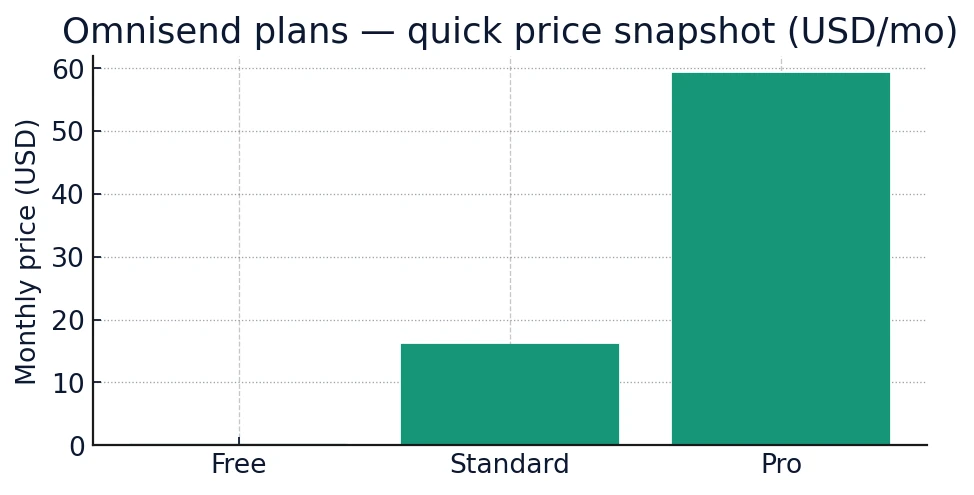
Pricing pages change often — confirm live before you decide.
Who should use Omnisend (and why)
Omnisend is built for ecommerce. You get email + SMS in one UI, native Shopify/WooCommerce events, prebuilt revenue flows, and unlimited email sends on Pro. It’s the fastest path from install to sales for first-time senders.
Automation = revenue while you sleep. Set once, sell daily.
Omnisend for beginners 2025 (Step-by-step) from install to first revenue:
1) Connect your store
- Sign up at Omnisend → Start Free.
- Connect Shopify or WooCommerce; approve permissions to sync customers, orders, and products.
- Import legacy lists (CSV) if switching tools; map fields (email, phone, tags, opt-in status).
Reference: Omnisend help center: Shopify integration & setup.
2) Authenticate your sender domain
- Add SPF + DKIM DNS records from Omnisend.
- Publish DMARC (p=none to start), then tighten policy after monitoring.
- Warm up sending: start with engaged contacts first (last 30–90 days activity).
3) Enable the 3 core flows (prebuilt)
| Flow | SMS | |
|---|---|---|
| Welcome (signup & popup) | Discount code + bestsellers | Short thank-you + code (optional) |
| Abandoned cart | Product block + social proof | Reminder w/ direct cart link |
| Browse abandonment | Recently viewed → related items | Nudge for high-value SKUs only |
4) Launch your first email campaign
- Create a “New arrivals & bestsellers” template → add product feed block.
- Target Engaged 30–90d (opened/clicked or purchased).
- Subject: “New in: bestsellers just landed” → preheader: “Back in stock + fresh drops.”
- Send-time: weekday business hours for B2C work well; A/B test send-time next send.
5) Launch your first SMS campaign
- Use consented numbers only (checkout consent + popup checkbox).
- Copy example: “{Brand}: 10% off today only. Shop: {short-url} Reply STOP to opt out.”
- Cap at 1 SMS/week per person initially. Respect local TCPA/GDPR rules.
6) Compliance in one minute
- Email: include postal address + easy unsubscribe.
- SMS: opt-in, brand name, offer clarity, STOP language, quiet hours where required.
- Honor data deletion/exports quickly (GDPR/CCPA).
Pricing & how to budget email + SMS for Omnisend for beginners 2025
Plans: Free (for testing), Standard (scale email), Pro (unlimited email with monthly SMS credits). Pro typically includes monthly SMS credits equal to the plan price; Free/Standard can add SMS credits as an add-on. All about pricing you can find: here
| What’s included | Free | Standard / Pro |
|---|---|---|
| Email sends | Starter limits | 12× contacts (Standard), Unlimited (Pro) |
| SMS credits monthly | Small bonus | Pro includes credits ≈ plan price |
| Automation & templates | ✓ | ✓ advanced splits & analytics |
| Support | ✓ 24/7 chat/email | ✓ priority on higher tiers |
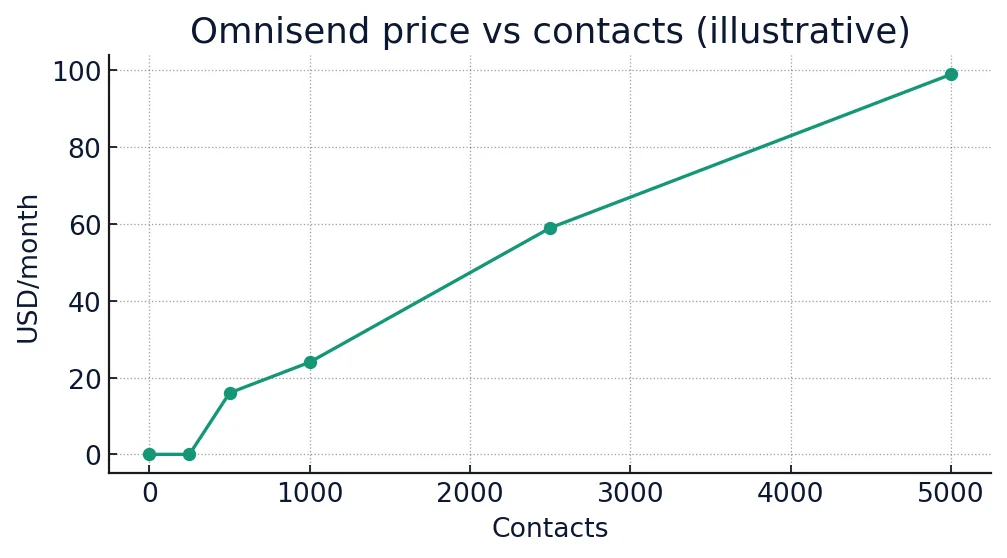
What you get on day one — features that matter
| Capability | Omnisend | Notes |
|---|---|---|
| Shopify/Woo plug-and-play | ✓ | 1-click app + data sync |
| Prebuilt revenue flows | ✓ | Welcome, Cart, Browse, Win-back |
| Product feed blocks | ✓ | Auto-pull images & prices |
| Unlimited email on Pro | ✓ | ✓ |
| Built-in SMS globally | ✓ | Credits add-on or included (Pro) |
| Checkout SMS consent | ✓ | Native + popups |
| Segments (RFM/activity) | ✓ | Engaged 30/60/90d presets |
| Split automations/A/B | ✓ | Path & subject tests |
| Revenue attribution | ✓ | Flow & campaign revenue |
| Deliverability tools | ✓ | List cleaning, suppression |
| Dynamic coupons | ✓ | Per-user codes |
| Back-in-stock alerts | ✓ | Email + SMS |
| Popups & landing pages | ✓ | Templates included |
| Shopify discount auto-apply | ✓ | Higher conversions |
| UTM & analytics | ✓ | GA4 compatible |
| Multi-store accounts | ✓ | Agency-friendly |
| Transactional email | ✓ | Order/shipping updates |
| MMS (US/CA) | ✓ fees apply | Only US/CA |
| Customer support 24/7 | ✓ | Chat + email |
| Shopify App Store rating | ✓ | Highly rated |
Your launch sequence (copy/paste checklist)
- Install app & connect store.
- Authenticate SPF/DKIM/DMARC.
- Turn on Welcome, Cart, Browse flows.
- Create “New arrivals” email campaign to Engaged 30–90d.
- Schedule follow-up SMS to “Clicked email but no purchase”.
- Set send cap (email 2–3/wk, SMS 1/wk initially).
- Review revenue attribution → scale segments & frequency.
Expected ROI & payback
Most stores see quick wins from abandoned cart + welcome incentives. Keep campaigns simple at first; let automations drive the bulk of revenue while you learn.
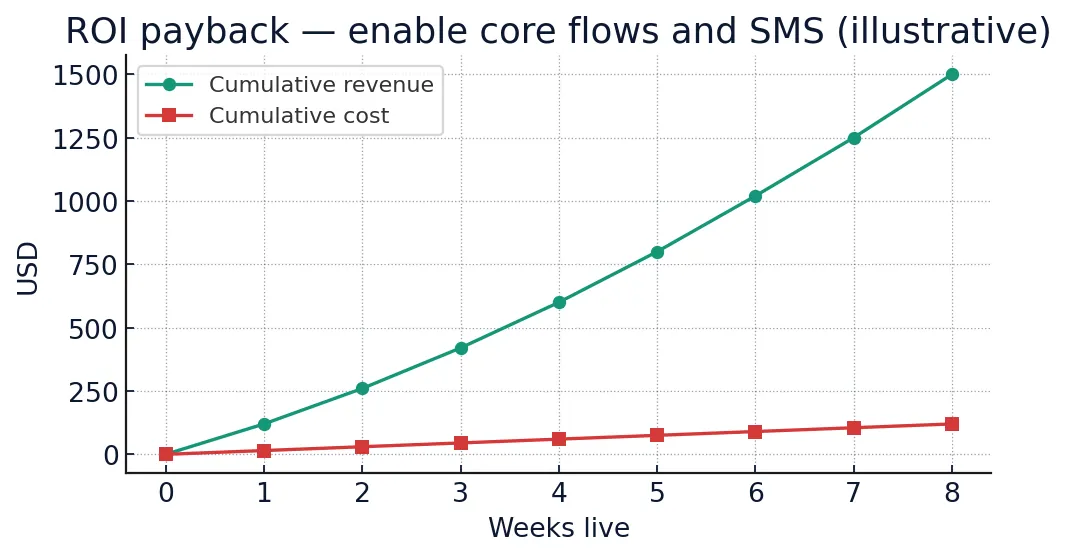
Final verdict
Go with Omnisend if you’re an ecommerce store that wants email + SMS in minutes, not weeks. Start on Free to test, then move to Standard for scale or Pro if you want unlimited email and built-in monthly SMS credits.
Sources & further reading for Omnisend for beginners 2025
- Omnisend Pricing — accessed Nov 4, 2025.
- Omnisend Help Center — pricing & SMS credits, Shopify integration — accessed Nov 4, 2025.
- TechRadar: Best email marketing software 2025 — accessed Nov 4, 2025.
Related on CEM:
Omnisend Pricing 2025
Omnisend deliverability vs Klaviyo (2025)