
Automation = revenue while you sleep. Set once, sell daily.
TL;DR — your 7-day win plan
- Day 1: Connect Shopify/Woo, sync products & contacts, import basic brand styles.
- Day 2: Turn on Welcome Discount + popup capture (single-step with SMS).
- Day 3: Activate Abandoned Checkout (3-email + optional SMS nudge).
- Day 4: Add Browse Abandonment + Product View trigger for high intent.
- Day 5: Send first campaign to engaged segment; A/B subject lines.
- Day 6: Enable Post-Purchase Cross-Sell + Product Review request.
- Day 7: Review revenue by flow and segment; scale what’s working.
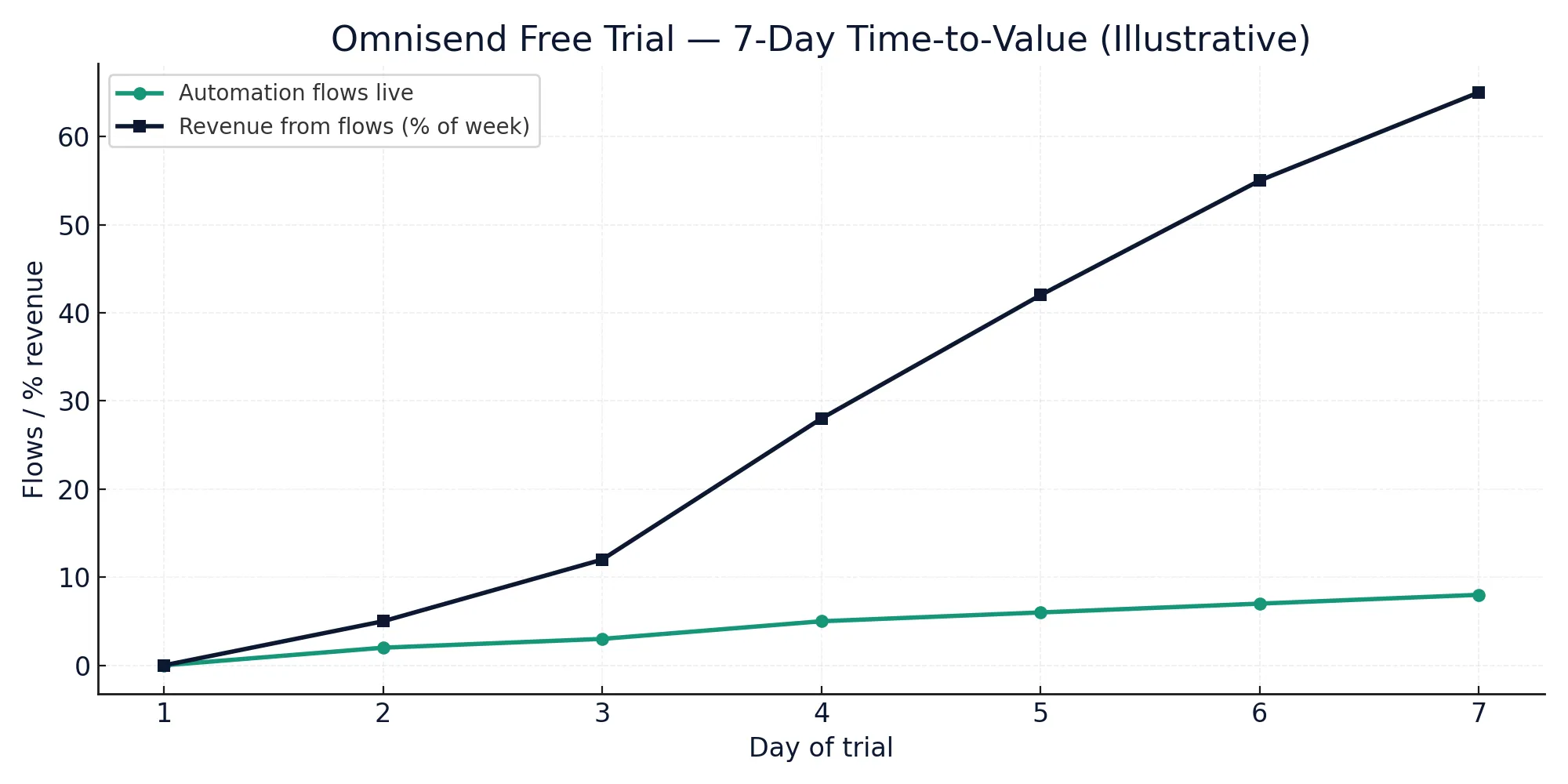
Pricing pages change often — confirm live before you decide.
What the Omnisend free trial includes (and how to use it)
Omnisend typically offers both a free plan and a time-limited trial of paid tiers. Regardless of trial length, the fastest revenue unlocks come from the four core flows: Welcome, Abandoned Checkout, Browse Abandonment, and Post-Purchase. Use this section to map features you need on day one.
| Capability | In free plan / trial | Notes for week-one revenue |
|---|---|---|
| Shopify/WooCommerce 1-click sync | ✓ | Instant product & customer sync |
| Drag-and-drop email builder | ✓ | Brand kit speeds launch |
| SMS sending (US/EU supported) | ✓ (carrier fees apply) | Use 1 SMS in Abandoned Checkout |
| Welcome flow templates | ✓ | Add incentive + 2-step sequence |
| Abandoned Checkout flow | ✓ | 3 emails + 1 SMS reminder |
| Browse Abandonment flow | ✓ | Trigger on product views |
| Post-Purchase & Cross-sell | ✓ | Enable on Day 6 |
| Product review request | ✓ | Boost UGC for future CTR |
| Popups & embedded forms | ✓ | Collect email + SMS consent |
| Segmentation (engaged, cart, view) | ✓ | Focus campaigns on 30-day engaged |
| A/B test subject lines | ✓ | Run on Day 5 campaign |
| Dynamic product feed blocks | ✓ | Auto-pull bestsellers/new-in |
| Timezone & smart send times | ✓ | Lift open & click rates |
| Deliverability tools (warming) | ✓ basic | Keep sends to engaged early |
| Transactional emails | ✓ may require setup | Optional for week one |
| Multi-store support | ✓ plan-dependent | Check trial tier |
| Advanced reporting | ✓ limited on free | Revenue by flow is enough |
| Support & onboarding | ✓ | Docs + chat for quick fixes |
| API & webhooks | ✓ dev-level | Not needed to earn in 7 days |
7-day checklist — the fastest path to revenue
Day 1 — Connect & brand
- Install Omnisend, connect Shopify/Woo, sync catalog.
- Brand kit: logo, colors, font; save as a master template.
- Deliverability: send to engaged first (no cold blasts).
Day 2 — Capture & welcome
- Popup with single-step email + SMS consent (clear incentive).
- Welcome flow: 2 emails (value intro → incentive reminder).
Day 3 — Abandoned Checkout (3+1)
- Three emails (10m, 4h, 20h) + optional SMS (at 24h).
- Personalize with product block + dynamic coupon.
Day 4 — Browse/Product View
- Trigger on product view; 2 emails (reminder → alternative picks).
Day 5 — First campaign (engaged segment)
- Segment: opened/clicked in last 30 days; exclude recent buyers.
- A/B test subject lines; smart send time.
Day 6 — Post-Purchase + Review request
- Cross-sell by product type; review request at delivery+3 days.
Day 7 — Review, scale, repeat
- Check Revenue → Automation vs Campaigns.
- Clone winning blocks, expand segments, schedule week two.
Related reads: Omnisend for beginners 2025 • Omnisend pricing 2025
Pricing & plan fit — what to expect after trial
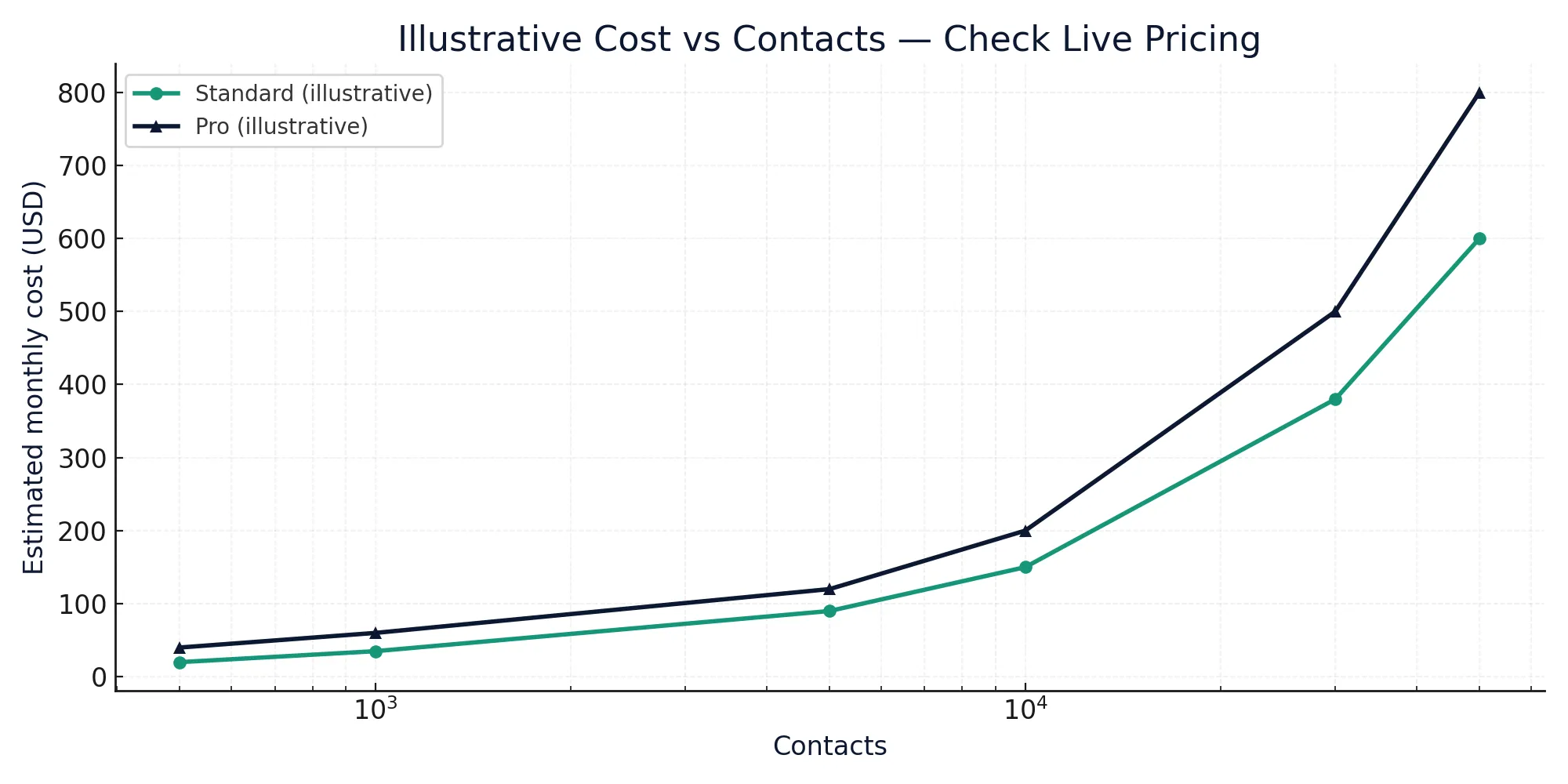
Use the trial to validate revenue from core flows. When you convert to a paid plan, choose the tier that covers your contacts, send volume, and channels (email + SMS). The chart below is illustrative — always confirm live pricing before purchase. Checkout all pricing plans & Omnisend free trial here.
Quick plan snapshot — map your next step
| Need | Trial / Free | When to upgrade |
|---|---|---|
| Core automations only (welcome, checkout, browse) | Start here | Upgrade when list or SMS usage grows |
| Consistent campaigns + A/B testing | Trial covers | Upgrade for higher monthly sends |
| Advanced reporting & segments | Basic | Upgrade for deeper analytics |
| Bigger multi-store operations | Trial varies | Check plan limits & add-ons |
ROI math: validate payback in weeks, not months
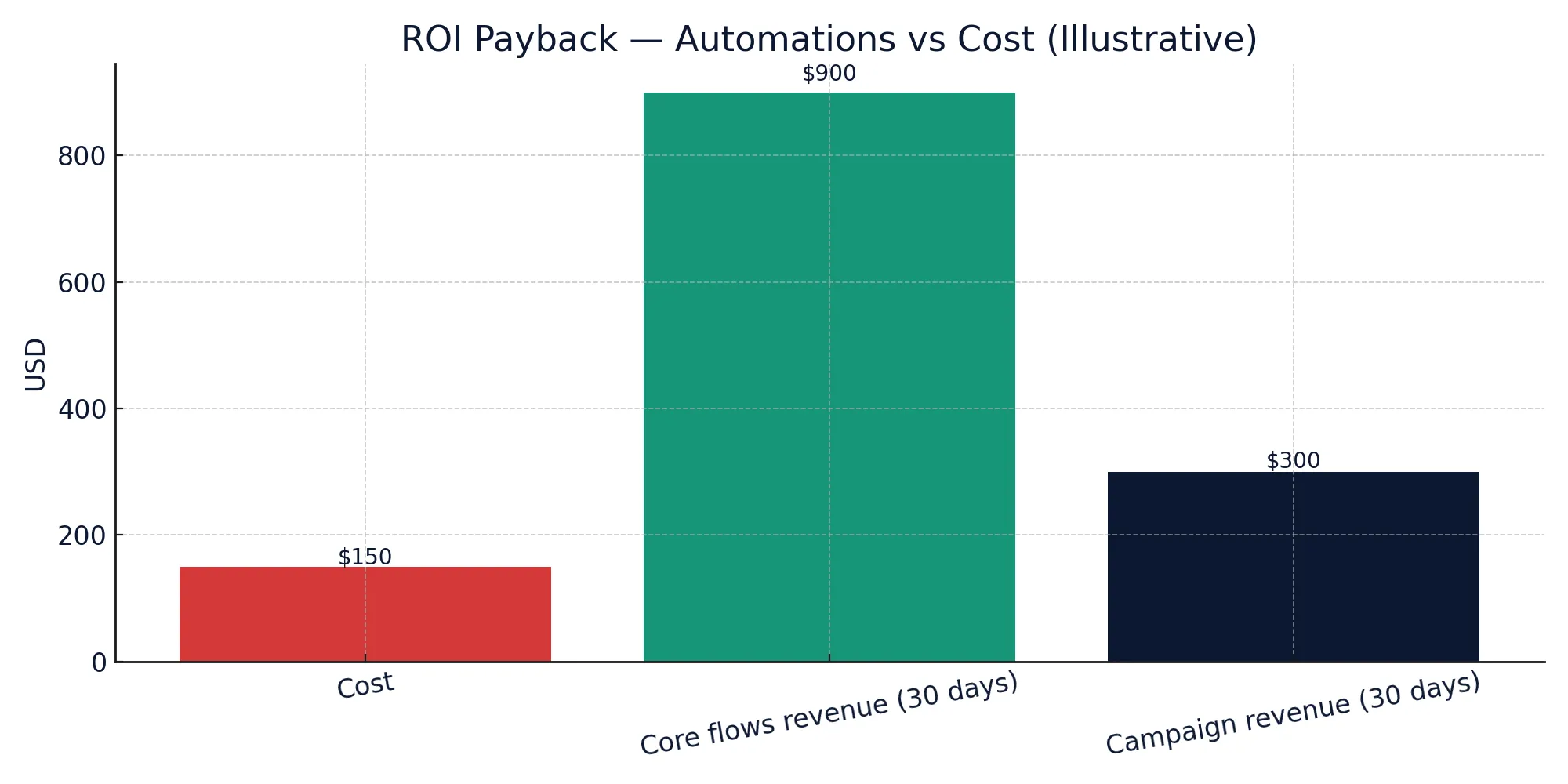
In week one, most revenue comes from Abandoned Checkout and Welcome. Add a single SMS reminder to lift conversions. Your goal is simple: make automation revenue exceed the projected monthly cost. As mentioned before you can start Omnisend free trial and that with no credit card needed.
Final verdict — who should start today
If you run Shopify or WooCommerce and want email+SMS automation that works out of the box, the Omnisend free trial (2025) is the fastest way to prove revenue. Use the 7-day schedule above, keep sends to engaged contacts, and let the core flows run. When automation revenue beats the plan cost, upgrade and scale.
FAQ
How long is the Omnisend free trial?
Trials can change by region and promotion. Expect enough time to launch the flows in this guide; confirm current length on the live pricing page.
Does the trial include SMS?
Yes, but carrier costs apply. Use 1 SMS in your Abandoned Checkout to maximize ROI. Read also this article: Omnisend for beginners 2025: your first email + SMS campaign
What if I have a small list?
Even a small engaged list can pay back quickly with Abandoned Checkout and Welcome automations. Start small, prove ROI, then scale.