
WooCommerce Email Automation: GDPR-Friendly Omnisend Flows
WooCommerce email automation works best when your store events trigger the right message for the right person — with consent handled cleanly. This hub gives you a practical framework, platform pitfalls to avoid, and the exact Omnisend next steps to implement.
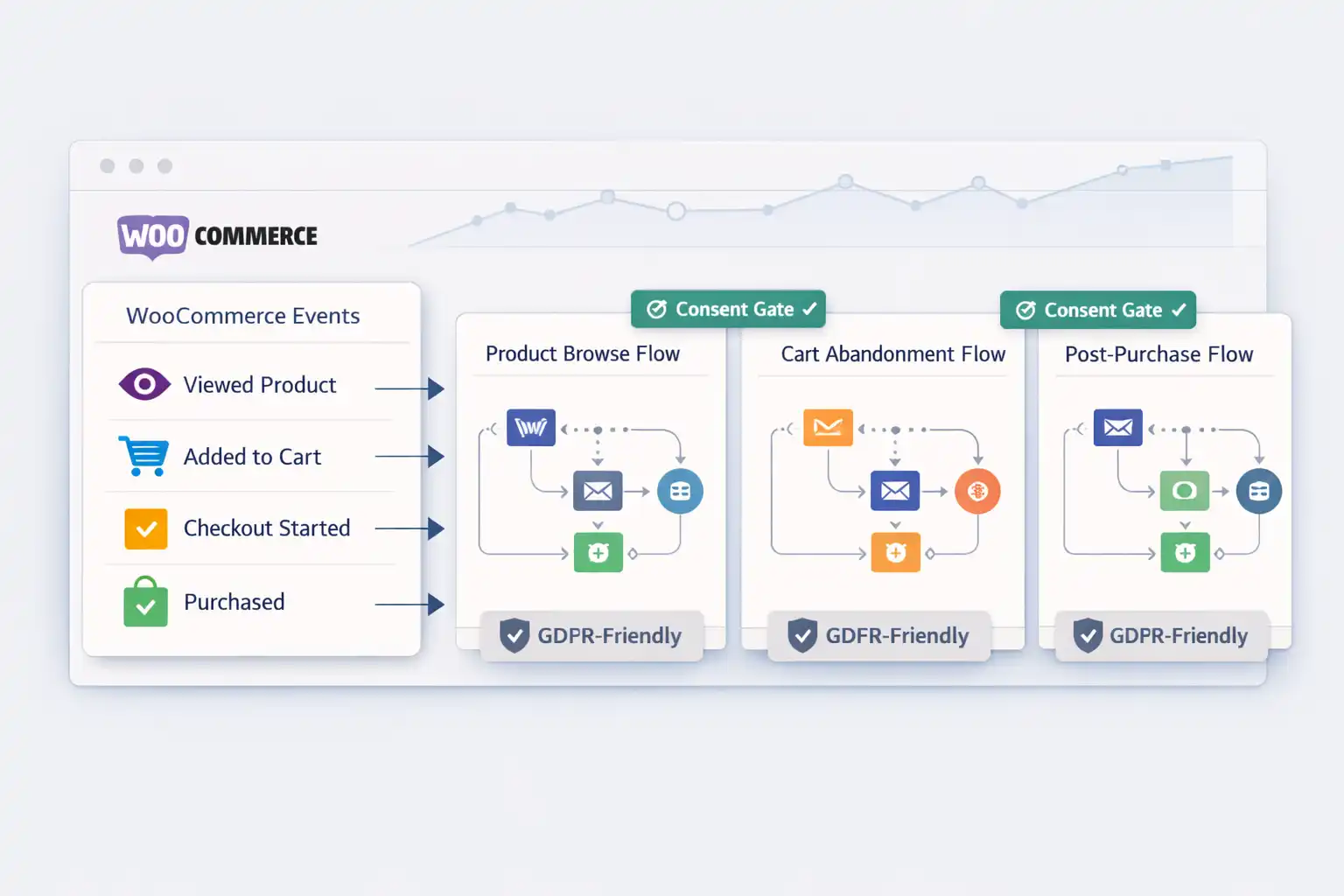
A simple definition (so your decisions stay clean)
WooCommerce email automation means using real store behavior (views, carts, purchases, inactivity) to send timely messages that move the customer to the next step — without turning your inbox into noise. The “win” is not more emails. It’s higher recovered revenue, higher repeat purchase rate, and fewer complaints.
Use Woo events, not guesses
Automations should start from concrete WooCommerce events: viewed product, added to cart, checkout started, purchased.
Add consent “gates” (EU-ready)
Marketing and transactional are not the same. Build flows with clear opt-in rules and channel-specific consent (SMS is stricter).
Launch in the right order
Start with the fastest ROI flow (abandoned cart), then welcome, then post-purchase, then win-back and VIP.
The GDPR-friendly framework for WooCommerce email automation
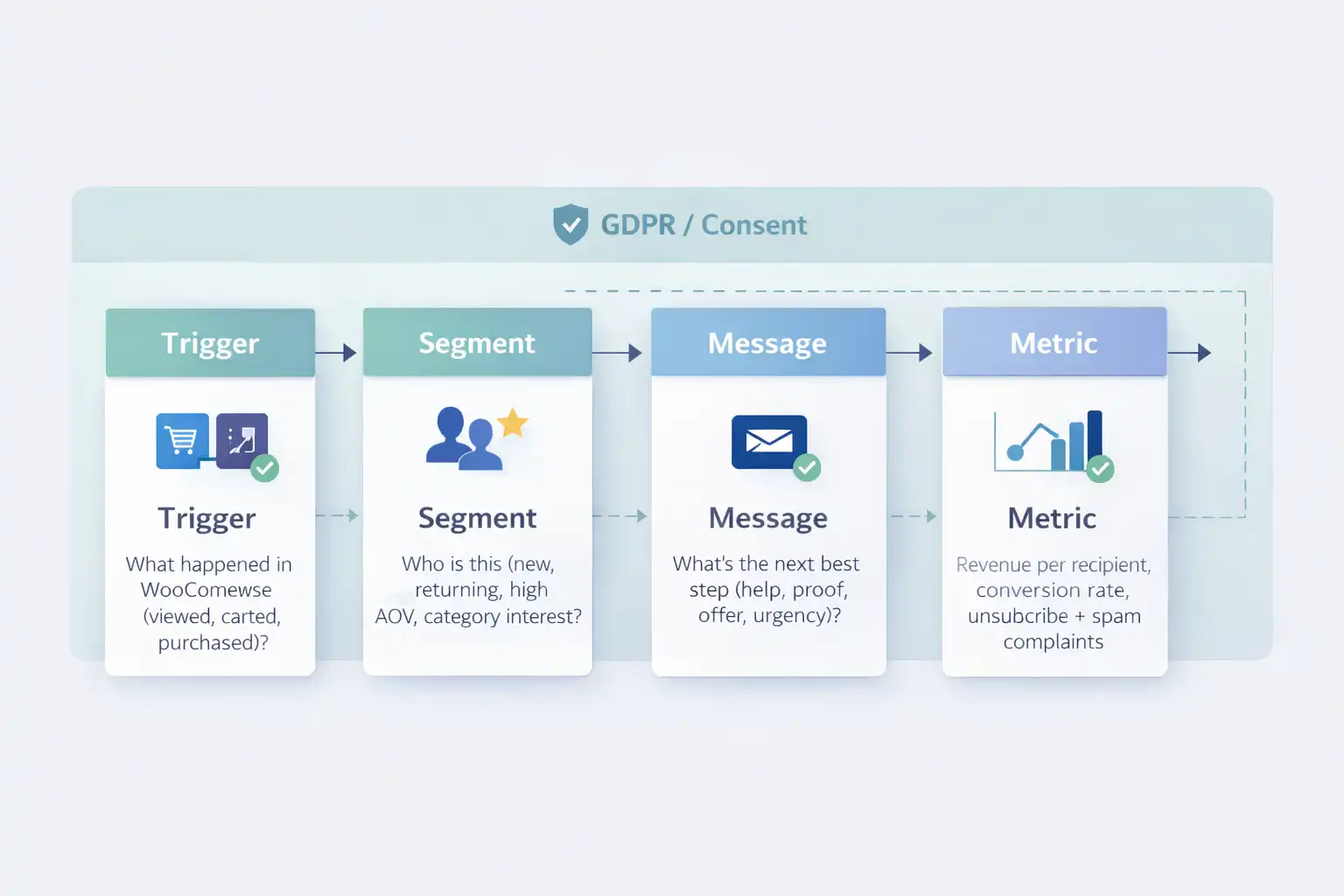
If you only remember one structure, use this: Trigger → Segment → Message → Metric → Iterate. It keeps your WooCommerce email automation predictable and prevents random “set and forget” spam.
Trigger → Segment → Message
- ✓Trigger
What happened in WooCommerce (carted, purchased, inactive)?
- ✓Segment
Who is it (new vs returning, category intent, VIP)?
- ✓Message
What’s the next best step (help, proof, offer, urgency)?
Metric → Iterate (what you actually optimize)
- ✓Metric
Revenue per recipient + conversion rate + complaint signals.
- ✓Iterate
Timing, suppression, segmentation, subject lines (small steps, weekly).
Transactional emails (order confirmations, shipping updates) are different from marketing automation. For EU compliance principles, see the official GDPR text: Regulation (EU) 2016/679.
The 5 core flows (and why they work)
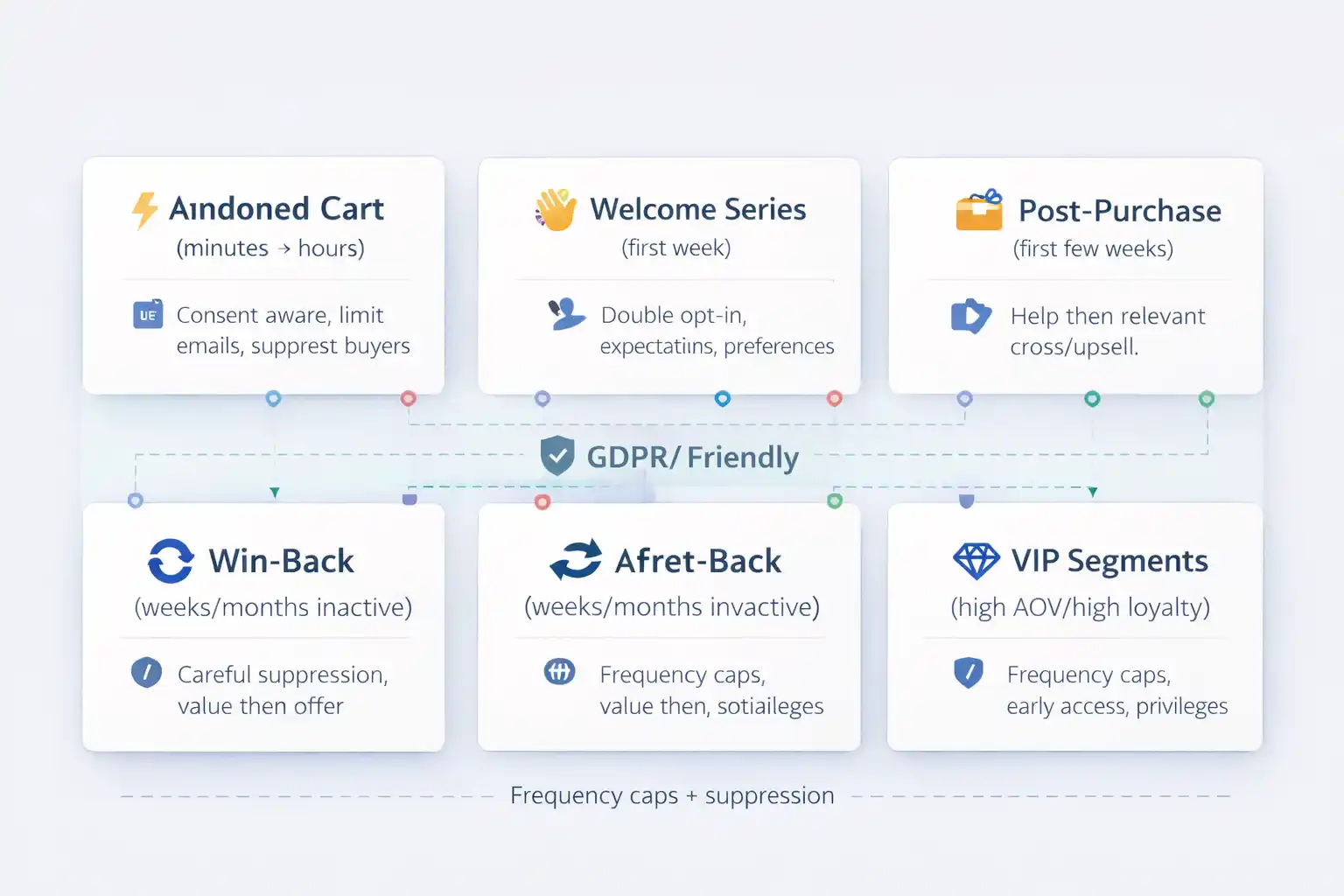
Most stores fail at WooCommerce email automation because they launch 10 flows at once. Start with 2–3, measure, then expand. Here’s the order that stays stable on EU traffic.
Abandoned cart (ROI-first)
Short timing, buyer suppression, and one clear reason to complete checkout. Incentives are optional — use them only if needed.
Welcome series (trust + consent)
Set expectations, confirm preference, introduce best sellers. If EU list quality matters, use double opt-in from day one.
Post-purchase (repeat buys)
Help first (setup/care), then relevant cross-sell. Reviews and reorder reminders can be powerful when timed correctly.
Win-back (smart suppression)
Trigger by inactivity window. Value first, offer later. Keep frequency low so you don’t hurt deliverability.
VIP segmentation
Reward repeat buyers and high AOV customers. Protect this segment with caps, exclusions, and careful messaging.
Browse abandonment (optional)
Use only when intent is clear (multiple views, deep browsing). Overuse increases complaints fast.
Which flow should you launch first?
Answer 4 quick questions and get a recommended launch order for WooCommerce email automation — plus the exact internal Omnisend pages to implement next.
Your recommended launch order
Select answers to see your tailored plan.
Common pitfalls (and how to keep EU-friendly performance)
WooCommerce email automation breaks when events don’t sync cleanly, when flows stack without suppression, or when consent rules are fuzzy. Use these guardrails so Omnisend flows stay stable.
Do this (stable + scalable)
- ✓Verify Woo events early
Confirm cart/checkout/purchase events fire reliably before building 8 flows.
- ✓Use suppression aggressively
Stop cart recovery when they purchase. Exclude recent buyers from overlapping promos.
- ✓Separate marketing vs transactional
Order updates are not a free pass for promotions. Keep templates clean and compliant.
- ✓Treat SMS as stricter
Pair with /sms-marketing-automation/ and keep frequency low.
Avoid this (risk + list damage)
- !Wide-open browse triggers
Too many “you viewed this” emails increase complaints, especially on EU traffic.
- !Discount as default
Incentives train customers. Use proof/help first; discount only when needed.
- !No consent clarity
If you want EU stability, set up double opt-in rules and records properly.
- !Optimizing only open rate
Optimize for revenue per recipient + complaint signals, not vanity metrics.
Deliverability mini-check
For WooCommerce email automation, deliverability is the “invisible” bottleneck: your best flow still fails if emails don’t land in the inbox.
- ✓Keep frequency reasonable
Fewer, better sends beat daily noise.
- ✓Remove unengaged contacts
Lower complaints and improve inbox placement.
- ✓Use value emails
Help/proof beats promos as the first message.
Consent mini-check (GDPR)
If EU list quality matters, set your consent path early and stick to it. This is the simplest way to keep WooCommerce email automation predictable.
Use double opt-in + GDPR setup to reduce junk signups, clarify consent, and protect deliverability.
Pros and cons of WooCommerce email automation
This is the tradeoff: automation gives predictable revenue — but only if you keep it disciplined. If you want “set and forget,” you’ll get short-term wins and long-term deliverability pain.
Pros
- ✓Revenue you can measure
Flows tie directly to events like carts and purchases.
- ✓Higher repeat purchase rate
Post-purchase help + relevance drives long-term LTV.
- ✓Better customer experience
Customers get messages that match where they are in the journey.
Cons
- !Setup discipline required
Events, suppression, and segments must be correct.
- !EU consent is not optional
Clarity and records matter if you want stability.
- !Requires iteration
Timing and messaging improve in small weekly steps.
What “good” looks like vs what breaks
Use this table as a quick diagnostic for WooCommerce email automation. If you see “risky pattern” on the right, fix that first — then scale flows.
| Area | Stable baseline | Risky pattern | Impact |
|---|---|---|---|
| Consent | Clear opt-in + records Double opt-in where list quality matters. | Unclear source Imported lists without proof. | Deliverability swings + complaint risk. |
| Cart recovery | Suppression Stop when they purchase. Cap frequency. | Over-send No suppression, too many reminders. | Short-term revenue, long-term list damage. |
| Post-purchase | Help-first Guidance → then relevant upsell. | Instant promo Hard sell immediately. | Lower trust + fewer repeats. |
| SMS | Strict opt-in Easy opt-out every time. | Loose permission “We’ll try it” approach. | Higher compliance/reputation risk. |
| Measurement | Revenue per recipient + complaints. | Open rate only Vanity metrics. | Misleading “wins”. |
5 trends shaping WooCommerce email automation (EU-friendly)
1) Consent-first list building
Stores prefer cleaner lists over bigger lists. Better signals → better inbox placement → more revenue.
2) Suppression as a “feature”
Not sending is often the best optimization. Caps and exclusions protect your best segments.
3) Value emails before discounts
Help, proof, and education reduce dependence on promotions and preserve margins.
4) Omnichannel timing
Email + SMS works when coordinated. Without coordination, it becomes double-spam.
5) Lifecycle metrics
Repeat purchase rate and revenue per recipient beat “opens” as the real scoreboard.
Implement WooCommerce Automations in Omnisend
Use these next-step pages to connect Woo events, build the highest-ROI flow, and lock in GDPR-friendly consent. This is the fastest path to stable WooCommerce email automation.
Connect store events, verify data sync, and avoid the “triggers don’t fire” trap.
Build cart recovery with timing, suppression, and conversion-safe messaging.
Set consent defaults that protect deliverability and reduce EU compliance risk.
WooCommerce email automation (GDPR) — quick answers
Do I need double opt-in for WooCommerce email automation in the EU?
Not always, but double opt-in helps keep your list clean and improves deliverability signals. If you want long-term stability on EU traffic, it’s often the best default for marketing signups.
Is abandoned cart email “transactional” or “marketing”?
It’s typically treated as marketing because the intent is promotional. Build it with clear consent handling, easy opt-out, and sensible frequency caps.
What’s the safest first flow to launch?
Start with clean Woo event sync, then launch abandoned cart. If complaint signals are already high, fix consent and list hygiene first.
How should I combine email + SMS without annoying customers?
Treat SMS as a higher-friction channel: stricter consent, fewer sends, and only for high-intent moments. Use suppression so you don’t hit the same user via both channels unnecessarily.
What metrics matter most?
Revenue per recipient, conversion rate, unsubscribe rate, and complaint signals. Open rate alone is not enough for sustainable WooCommerce email automation.
Ready to make WooCommerce email automation actually work?
Start with correct WooCommerce event sync, launch the ROI-first flow, then lock in consent. Keep it lean, measure weekly, and scale only after the first 2–3 flows are stable.